
Smore logo
remove_red_eye 278
page background

Principal's Update

Springwater Trail High School - September 25th, 2020

Principal'sUpdateSpringwater Trail High School - September 25th, 2020
zoom_out_map

Springwater Trail High School

Website: http://stweb.gresham.k12.or.us
Location: 1440 SE Fleming Ave, Gresham, OR, United States
Phone: 503-261-4600
Facebook: https://www.facebook.com/SpringwaterTrail/
Twitter: @STHS_Titans

Principal's Message


Hello Springwater Students and Families,


We all have successfully navigated the first week of classes! Thank you for your patience, time, and energy to make this first week a success!


We have our first Site Council meeting this coming Tuesday morning (9/29) at 8:30am. Site Council is an opportunity for parents to learn about (and provide input/feedback regarding) upcoming school events and all things distance learning! If you are interested in participating in Site Council, please email Koryna Herreid at herreid@gresham.k12.or.us for more information.


If you haven't picked up a district chromebook, you can call/email the office and schedule a time to pick one up! To minimize technology conflicts, we strongly recommend all students use a district chromebook. If you are having internet connectivity issues, reach out to us and we can find a solution (including checking out a hotspot, if needed).


Balancing life, school, and work is always a challenge. Having to do all of this within the walls of your home is even more challenging! In this principal's update we have included some pointers/suggestions to help students maximize their focus and engagement during distance learning.


And remember: If you have questions, please don't hesitate to reach out to us.


Stay safe and take care,


Ryan Blaszak

Springwater Main Office: 503.261.4600

blaszak@gresham.k12.or.us

Distance Learning Strategies Distance Learning Strategies

Distance Learning from home is NOT easy! Below are some suggestions/pointers for maximizing your success during distance learning.


  • Post a schedule of your classes close to your computer
  • Set reminders for your classes on your phone / chromebook
  • Find a quiet place to participate in Google Classroom meetings. (We understand this can be extremely challenging when everyone is stuck at home!)
  • Work with family members to minimize disruptions during live class sessions.
  • Remember engagement and communication are more critical than ever during distance learning. Communication is about human connection, understanding, and community: all of which are priorities for us and part of the reason you chose to attend Springwater!
  • It can take time to become comfortable turning your camera on and there are other ways to show you are engaged. Below are some ways to communicate and engage during live class sessions:
-------> * Use the thumbs up/down/raised hand emojis to interact with your teacher

-------> * Use your microphone to ask and answer questions.

-------> * Use the chat feature to ask questions and get clarification.

-------> * Let your teacher know (through the chat) if you have to step away from your computer for a moment.

eGBSD High School Daily Schedule eGBSD High School Daily Schedule

pdf
insert_drive_file
20-21 HS Distance Learning Schedule.pdf
Download
65.1 KB

2020 - 2021 School Year Calendar

Below you can download the updated/latest GBSD High School calendar for 2020-2021.
pdf
insert_drive_file
HS Calendar 20-21 9.16.20 .pdf
Download
192.9 KB

School/ID Card Pictures

If you got your school picture taken yesterday at supply pick up and would like to order pictures please see the picture order form below.

We have a picture retake day scheduled for Friday, November 13th.

pdf
insert_drive_file
Picture Order Form .pdf
Download
967.3 KB

STHS Mentoring Program

Springwater Trail High School will be launching a mentoring program this year that connects members of our Leadership class with our freshmen. We hope that conversations with older peers will help them not only meet the academic challenges of transitioning to high school but also give them a sense of belonging in our school community. More details will be forthcoming.

Grab & Go Meal Information Below

ALL students are eligible for free lunch through December 31st, 2020! Click the Meal Info document below for more information.
pdf
insert_drive_file
Meal Info .pdf
Download
441.0 KB

FREE Health Coverage

Free health coverage is offered by the State of Oregon. View the brochures below in english and Spanish for additional information.
pdf
insert_drive_file
Oregon Health Plan Access Support ENG.pdf
Download
992.5 KB
pdf
insert_drive_file
Oregon Health Plan Access Support SP.pdf
Download
999.2 KB

Device Distribution

It is preferred that ALL students check out a GBSD chromebook rather than use their own devices for Distance Learning. For example, Google Meet links sometimes do not display if you are accessing Google Classroom from a phone.


If you still need a chomebook or internet Hotspot, please call the Springwater main office at 503.261.4600 or email herreid@gresham.k12.or.us.

Back to School Enrollment Verification

Thank for to all who have completed the enrollment verification for the 2020-2021 School Year!


If you haven't had the chance yet, we request that parents/guardians review and/or update their family and student information.


Keeping your family's information up to date is crucial to receiving timely communication from Springwater Trail High School and Gresham-Barlow School District and ensures that you can be contacted in case of an emergency. This year all updates can be done online through your ParentVUE account.


After logging in to ParentVUE, click on the "Online Registration" tab in the top right-hand corner to start the verification process.


Don't have a ParentVUE account or having problems completing the verification? Please email Herreid@gresham.k12.or.us or call 503-261-4600 to obtain your activation code and get support.

Textbook, Supplies, and 19-20 Yearbook Pick Up

Textbook pick up was yesterday (Thursday September 24th). But don't worry if you missed it!


If you missed it, please call the office (503.261.4600) or email Koryna (herreid@gresham.k12.or.us) to schedule a time to swing by and pick them up.


We also distributed art supplies to students enrolled in art during Quad 1 and yearbooks to students who ordered them last year. We will have a picture re-take day later this fall.

zoom_out_map

STHS FAQs (August 2020)


We will be adding to this FAQ as information becomes available for the upcoming school year.


Question: What school supplies do I need to begin the school year?

Answer: STHS recommends having lined paper, a few pencils and pens, and a notebook or other organization system for your different classes and assignments. Throughout the first week of school, teachers will share any additional class-specific items your student may need. If you need help with school supplies, please reach out to our office at 503.261.4600. We want to make sure every student has the supplies they need to be successful in school this year.


Question: When is registration?

Answer: Registration has moved online beginning this year. Please complete the enrollment verification online through ParentVue (see above for more information).


Question: What do I need to do to make sure my student is ready to go this fall?

Answer: Please confirm your enrollment information with us so you will continue to get all of our communication. Please check out a chromebook from the district for each of your students.


Question: How do I get a chromebook for the fall?

Answer: Please call or email Koryna Herreid and we will make alternate arrangements. Our office number is 503.261.4600. Her email is herreid@greshamk.k12.or.us


Question: What if I have questions about my student's schedule?

Answer: Please email Linda Centurion at centurion@gresham.k12.or.us or give her a call at 503.261.4611.


Other questions? Please call Springwater at 503.261.4600. Thank you!
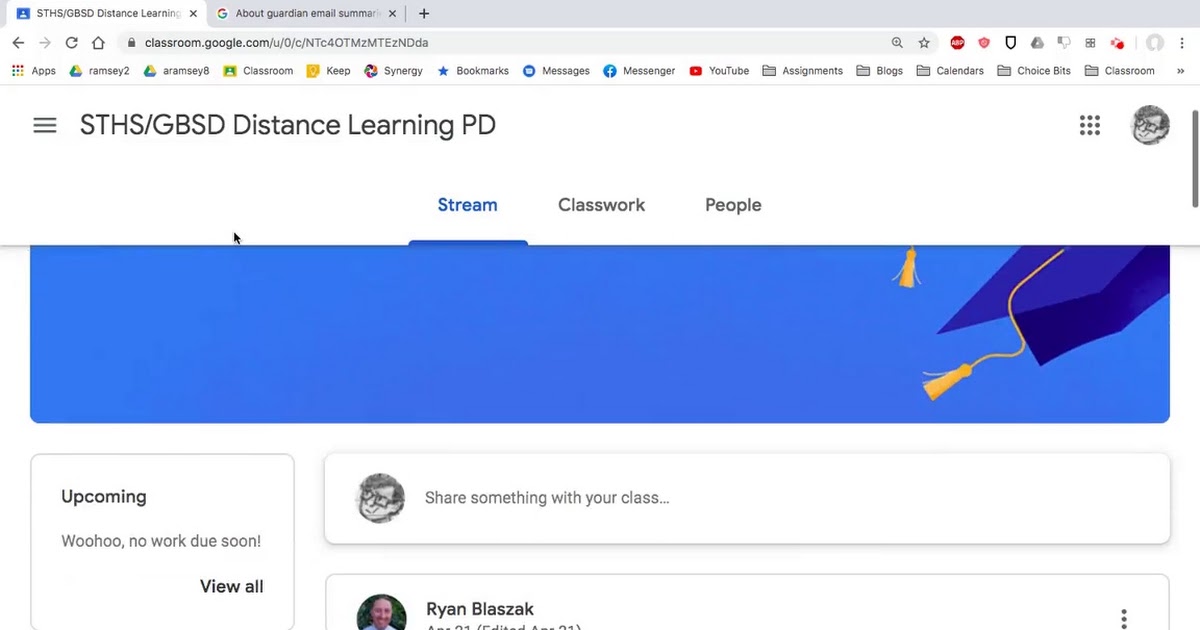
Google Classroom Overview Google Classroom Overview

Watch the videos below to get a helpful overview of Google Classroom, from both the student and parent perspective. NOTE: If you are not receiving parent updates via email and would like to, please contact Erin Norden at norden@gresham.k12.or.us or 503.261.4600 and we will confirm your email in our system and help get you set up!

STHS Google Classroom Tutorial from Mr. Ramsey STHS Google Classroom Tutorial from Mr. Ramsey

Navigating Google Classroom.webm

Navigating Google Classroom.webm

launch drive.google.com

Google Classrooom 101 Video Google Classrooom 101 Video

Google Classroom 101 for Students & Parent/Guardians
zoom_out_map

Report Cards Online

Parents, did you know you can access your student's progress reports and report cards online through ParentVue? To access the report card from your ParentVue account, just click on the 'report card' button on the left side. Paper report cards will be available by request only. If you have trouble logging into your ParentVue account or need to get it set up, please contact Koryna Herreid at 503-261-4600 or Herreid@gresham.k12.or.us.

zoom_out_map

Volunteering

Interested in Volunteering at STHS for the 20-21 school year?


1) Go to the district website at www.gresham.k12.or.us

2) Hover over “About Us” and click on “Volunteer Information”

3) In the left-hand menu, click on “Volunteer Application Form”

4) Fill out the online application

5) Record your volunteer badge number


Once completed, the approval process can take up to two weeks.

Happy volunteering!

NOTE: The application is not mobile compatible. This must be done on a laptop or desktop computer.

zoom_out_map

Springwater Attendance

If your son/daughter is struggling with distance learning for any reason, please reach out to your student's teacher or the office (503-261-4600) so we can help create a solution. Teachers are also tracking weekly participation and engagement. If you student receives a "NC" (Needs Contact), someone from our school will reach out to you. Please see additional attendance information in attachments below.

Every Day Matters in eGBSD Every Day Matters in eGBSD

pdf
insert_drive_file
Attendance Eng Fall 2020.pdf
Download
302.9 KB
pdf
insert_drive_file
Attendance Sp Fall 2020.pdf
Download
315.9 KB
zoom_out_map

Electronic Flyers

Gresham-Barlow Distict has launched a new electronic flyer tool called “Peachjar.” This service allows us to “go green” and will ensure that every flier is delivered to each household. Peachjar will provide flyers directly to your computer, tablet or mobile device.


To view school-approved flyers, simply click the Peachjar button on your school’s website.

zoom_out_map

Upcoming Events

For a list of upcoming events, visit the Springwater Trail High School Website and click on view calendar on the right side of the screen.
zoom_out_map

PARENTVUE

Gresham-Barlow School District’s ParentVUE provides parents and guardians access to information regarding their children’s demographic information, attendance activity, reporting period grades and class schedules via the Internet. You may login to ParentVUE using the link on the Parent Resources Page. If you need assistance logging into your ParentVUE account, please contact the Office at 503-261-4600.
Loading indicator

close

Created with

Communicate quickly and effectively with interactive newsletters.

Smore empowers educators to connect with their community, streamline school communications,
and increase engagement.

Create a newsletter