
Smore logo
remove_red_eye 28.8K
page background

Google Expeditions!

Where will they take you?

GoogleExpeditions! Where will they take you?
zoom_out_map

WOW! You DON'T Need a VR Viewer to take your class on an expedition!

Did you know you DON'T need Google Cardboard or a VR viewer to take your kids on a virtual field trip? You can lead an expedition and still give your kids a 360-degree view on a tablet! Thank you to Laurie Anastasio for sharing this information with me!

1. Lead your class on a 360 degree expedition on their tablets!

As long as your tablets are all on the same wifi you can choose an expedition and lead your class on a virtual field trip right on their iPad or Android device! As the guide you still have the same awesome background information provided to you on the expedition and can lead your class through different scenes targeting specific places.

2. Small group exploration.

Many of us only have a few ipads available in our class so a whole class expedition might not be possible yet. However, with just a few ipads on the app you can set up to lead an expedition and have your students visit a faraway place or dive back in time in a small group or station rotation.

3. Only one iPad or tablet? Don't let that stop you!

Even with only one iPad hooked up to a projector and your smartphone or additional tablet you can still lead your whole class on an expedition together. Take a 360 view of your destination and have kids come up and lead or explore.

4. Explorer of the day!

Perhaps you have one VR Viewer or Google Cardboard and an old (or new) phone. Don't let that stop you from giving your kids the full virtual reality experience. Choose an "Explorer of the Day" and have that student visit a place you are studying as a class or let them pick. Once they "return" from their trip have the student practice their public speaking skills by giving the class a summary of their trip and a few things they learned on their journey.

Rachel Marker (@RachelMarker) had a great suggestion to have students share their findings with other tools like SeeSaw or even have a class "Explorer" podcast where each explorer records an episode about where they traveled. Below are a few resources for getting started with podcasts in your classroom.

Ditch That Textbook: Why your students need a podcast and how to do it fast and free

EdTech Teacher: Using Podcasts in the Classroom

ReadWriteThink.org: The Nuts and Bolts of Creating Podcasts

5. The Virtual Reality experience.

Got a whole class set of VR Viewers and smart phones? Great! Take your class on a field trip. Kasey Bell (@shakeuplearning) has a fantastic post on Getting Started with Google Expeditions and Virtual Reality. She has some wonderful suggestions and even breaks down different VR headsets available.

Take a look at where you can visit!

Check out this list of all of the available Google Expeditions! Search by grade, subject or location.
Virtual Reality | United States | Aquila Education

Virtual Reality | United States | Aquila Education

Official Google Expeditions Kit partners. Virtual reality lesson plans, teacher professional development, education technology and online courses for CTLE.

launch aquilaeducation.com
Search Tes resources of available Google Expeditions that now include links to available lesson plans!

Search Tes Resources

Tes provides a range of primary and secondary school teaching resources including lesson plans, worksheets and student activities for all curriculum subjects.

launch goo.gl

More Resources! More Resources!

zoom_out_map

Google Expeditions & HyperDocs

Blog post all about pairing HyperDocs and Expeditions. Example pairings included!

Google Expeditions & HyperDocs. A Perfect Pairing.

zoom_out_map

Google Expeditions HyperDoc Template

Create your own HyperDoc to pair with a Google Expedition!

Template

zoom_out_map

Google's New AR Expeditons

Check out the new AR expeditions from Google!
Post link

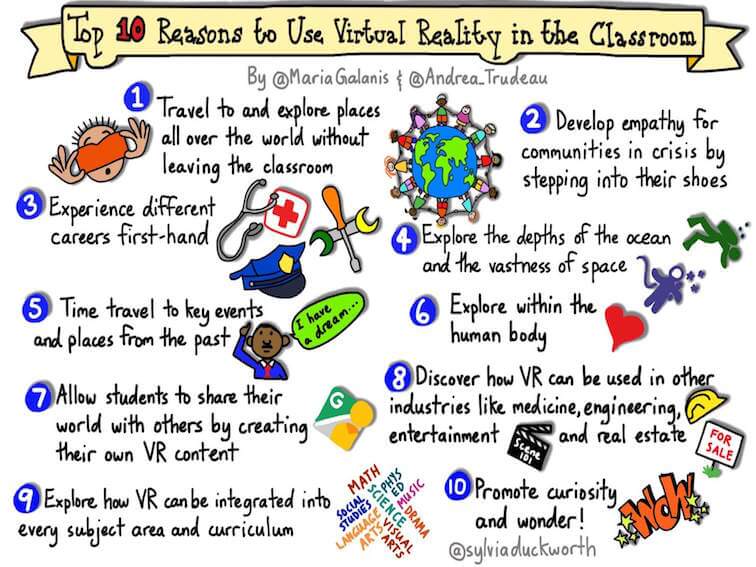
10 Reasons to Use Virtual Reality in the Classroom 10 Reasons to Use Virtual Reality in the Classroom

10 Reasons To Use Virtual Reality In The Classroom -

10 Reasons To Use Virtual Reality In The Classroom -

launch teachthought.com

Share Your Ideas Too! Share Your Ideas Too!

On January 26th Doug Fisher moderated a #Ditchbook chat on using Virtual Reality and Google Cardboard in the classroom! It was a fabulous chat and great way to share ideas and snag some new ones too! You can keep sharing your ideas by posting them on Twitter using the hashtag #Ditchbook.
zoom_out_map

Thanks for reading! Hope you found the resources useful.

Questions? Comments? Feedback? Please feel free to contact me anytime.

Email: kdmoura@gmail.com
Twitter: @KarlyMoura

Loading indicator

close

Created with

Communicate quickly and effectively with interactive newsletters.

Smore empowers educators to connect with their community, streamline school communications,
and increase engagement.

Create a newsletter