Smore logo
remove_red_eye 1.6K
page background

This Week @ PS 88Q

October 1st, 2023

This Week @ PS 88Q October 1st, 2023

Picture Day Is This Week: Tuesday, October 3 and Wednesday October 4 Picture Day Is This Week: Tuesday, October 3 and Wednesday October 4

zoom_out_map

A Message From Mrs. O'Shaughnessy

Happy October! We have officially moved through our first month of school. September is always such a busy month, returning to school, new class, new students, new adventures. We are excited for this month, and all of the upcoming special events.

This past Friday, we experienced rain that was more than just an inconvenience, but for many communities, dangerous. I am sure you all have seen the footage from some NYC communities, where it became dangerous in a matter of minutes, with cars submerged, basements flooded. As we received guidance from the Deputy Chancellor at 1:56pm, dismissal we knew would be difficult, especially down the large school yard. I want to thank all the staff and families who exhibiting extreme caution and patience with one of our most challenging dismissals. Through that chaos of terrible weather, hand to hand dismissal is even more vital (as umbrellas can sometimes cause a visual distraction). I hope everyone went home, changed into dry clothes and enjoyed the rest of the night.

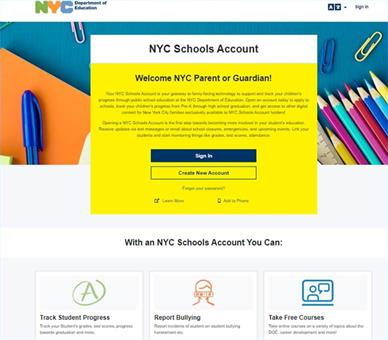
Many questions families have are regarding the NYC DOE platforms, student email accounts, logins, and NYCSA. I hope I can answer some of your questions. They are two different portals. TeachHub requires the student email. NYCSA is only accessible through the legal guardian/parents email. I am including information below to support you.


Have a wonderful week!

TeachHub: All Resources TeachHub: All Resources

How Does My Child Access All DOE Resources?

TeachHub is a portal to support students and teachers. The portal provides quick links to essential applications


Every New York City public school student has a DOE account. It is created automatically when you enroll in school. Your DOE account stays the same the entire time you are in school, and with it you can access all DOE technology platforms.

Getting Started

Your school must give you your username and password for your @nycstudents.net account. Once you have these, you can start signing into DOE applications.

Your school may give you a generic password. If so, we recommend you reset the password yourself, to something unique. This will give you more safety and security. Instructions on how to reset your own password are below.

The best way to start using your DOE account is to sign into TeachHub. From here, you can access all DOE applications with one click, and you only need to sign in once.

Resetting Your Password

There are three different ways you can reset your DOE password:

1. Reset it yourself through the Student Self-Service tool.

To use the Student Self-Service(Open external link) tool you must have created a PIN or set up security questions. If you have not done either, see options 2 and 3. Through this method, you can reset your own password once every 30 days.

2. Ask your parent or guardian to reset it through NYCSA.

Your parent or guardian can reset your password in NYCSA. If they don’t have a NYCSA account, they can create one for free.

3. Ask your school to reset your password for you.

If you are unable to reset your password, contact your school for help. They can find instructions on how to reset your password on the Reset Student Account Passwords page (DOE staff only) on the InfoHub.

PINs

By default, a PIN is not set for your account. You must create a PIN yourself. Your school does not have, or create, a PIN for you. There is no universal PIN for your school.

To create a PIN:

  1. Sign in to the Student Self-Service tool with your DOE username and password.
  2. Go to the left menu bar, and click on Pin Reset (this applies for creating a new PIN).
  3. Enter a PIN.
  4. Confirm your PIN by entering it again.
  5. Click on Save Changes.
  6. That’s it. An email will be sent to your DOE account to confirm you created a PIN.

Please note that PINs are optional for your DOE account. However, if you do not create a PIN, you will not be able to use the self-service tool to reset your password. If you feel like it would be hard to remember your PIN, or you are the parent of a young student, we recommend resetting your password through NYCSA.

Security Questions

Like a PIN, security questions are, by default, not set up. You must set them up.

To set up security questions:

  1. Sign in to the Student Self-Service tool with your DOE username and password.
  2. Go to the left menu bar, and click on Security Questions.
  3. Select and answer three questions of your choosing. Make sure you choose answers that you will remember.
  4. Enter your password.
  5. Click on Save Changes.
  6. That’s it. An email will be sent to your DOE account to confirm you set up security questions.

NYCSA: Parent or Legal Guardian Access to Student Information NYCSA: Parent or Legal Guardian Access to Student Information

The new NYC Schools Account (NYCSA) Portal will allow you to:

  • See your students grades, test scores and more in My Student
  • Take classes in Parent University
  • Report bullying
  • Access forms for your child
  • Reset your child's DOE account password
  • Access SupportHub

All with one login!

NYC Schools Account NYCSA

NYC Schools Account NYCSA

NYC Schools Account (NYCSA) is an app that helps you track your child's education. Through NYCSA, you can see their grades, attendance, fitness results, schedule, and more. Find out how to sign up, now.

launch schools.nyc.gov

Lunch Forms

Each year, our school distributes and collects the Family Income Survey. You may ask, what is this and why is it so important? The Family Income Survey, or as we have always referred to it as the lunch form, is one of the major funding sources for our school. Through collection of this form, we receive Title I funding. We need 100% return rate to guarantee a minimum of 60% of our families at or below what the government considers low income. We received a substantial amount of money


  • What is Title 1?
    • This federal program provides supplemental financial assistance to school districts/schools with a high percentage of children from low-income families, to provide all children a significant opportunity to receive a fair, equitable, high-quality education and to close educational achievement gaps.
  • What do we use these funds for?
    • Title I funding is used for after school programs, student resources, technology, family events, staff, interventions and at risk services.

If you haven't completed already, you can complete just by clicking the link below.

Click Here to Complete Online

After School Opportunities After School Opportunities

Mr. Alboum’s After-School Music Clubs

Marimba Club. Students will learn music for Marimba and percussion based on original music from playmarimba.com and arrangements from the Louisville Leopards.


Recorder Club. Students will learn how to play the recorder, starting with 3 notes, then 5 notes, then beyond. We use Taylor Swift play-alongs among other songs. As their level increases, the possibilities for repertoire will grow.


Chorus. There now is scientific proof that singing together in a group improves brain function and leads to a happier life. In chorus we always have fun, with repertoire choices from students and Mr. Alboum.


Classical Music Club: MUSIC MEMORY

This Classical Music Club is designed to develop critical listening skills and ways to differentiate instrumental sounds of the orchestra. We learn to hear patterns and common musical devices, so the music doesn’t seem like random sound. The students are educated in 16 pieces of music through the use of visual listening and video maps, movement, play-alongs and other fun modes of learning. We always have fun and sometimes even work out to classical music.


At the end of the year, there is a competition between the other Music Memory schools in New York City. Those who can identify each piece by name and composer and are also able to identify a piece of music in the style of a composer will be the winning team. This is one of my personal favorite programs and I look forward to having fun with the students. – Mr. Alboum

Updated Health Guidance From the DOE

Stay Home When Sick

Rest can help you and your child get better sooner, and it helps prevent the spread of germs.

  • Children with diarrhea should stay home until the diarrhea has stopped (stools are formed).
  • Anyone with a fever should stay home until 24 hours after being fever free or until their doctor says it is okay to go back to school or daycare. They should stay home for at least 5 days if they are diagnosed with COVID-19.
  • If your child is having difficulty breathing, call your doctor right away.
  • If your child has symptoms of COVID-19, please see guidance(Open external link).
    • Get tested, if your child is positive, have them stay home and separate from others for at least 5 days, and talk to their health care provider about treatment. See more information on isolation(Open external link).
Click Here For More Information

Kids Rise: Save For College

The NYC Kids RISE Save for College Program provides families, schools, and communities with a way to work together to save for their children’s futures. It’s a scholarship and savings program designed to make college and career training more accessible and achievable for all NYC public school students, starting in kindergarten—regardless of their family’s income or immigration status.

By providing upfront scholarships for every eligible student, tools and information for families to develop their own college and career savings plans, and a way for entire communities to invest in their children, the Save for College Program enables all of us to work together to build assets and support expectations of educational and economic success for every child.

Welcome to the NYC Kids RISE Save for College Program
Click Here For More Information

Ms. Kuqi and Class 5-410 Ms. Kuqi and Class 5-410

zoom_out_map

Students Facililating

zoom_out_map

Students Collaborating

zoom_out_map

Students Succeeding

zoom_out_map

Kindergarten Recess

zoom_out_map

Fun With Friends

zoom_out_map

Learning Happens Everywhere

PTA News PTA News

NEWS FROM THE PARENT TEACHER ASSOCIATION (PTA):


FALL PICTURE DAY is Tuesday 10/3 and Wednesday 10/4!

And, yes, we are returning to group class photos this year!

Your teachers will let you know which date your class is getting pictures taken.


We strongly encourage you to order online at: www.mylifetouch.com

Our Picture Day ID is: EVTZZSRR4

Or you can use the hard copy order form (sent home in all student folders) and send check or EXACT cash (NO change will be given) on the day.


ALL students will have their picture taken on Picture Day, even if you have not placed an order. So don’t worry, you can order online at any time!


This is our first Fundraiser of the year and also your first Volunteer Opportunity of the year!

We need TWO more volunteers. Sign up for a shift here:

https://www.signupgenius.com/go/10C0848ACAB2FA2FDC70-44558512-fall


If you’re interested in volunteering but can’t commit to the full shift, please email Samantha at pta88president@gmail.com.


WEEKLY REMINDERS:


Don’t forget to join our PTA email list and take our short survey here: https://forms.gle/giwhAU7FVfjM6FW19

(If your child attends PS88Q, you are automatically a voting member of the PTA. BUT we need to collect your email directly FROM YOU in order for the PTA to email you. We cannot get that information from the school.)


The PTA page on the website always has updates and links to important information. There is an important meeting coming up so please check it out here:

https://www.ps88q.com/apps/pages/index.jsp?uREC_ID=2276250&type=d&pREC_ID=2206723


As always, email Samantha (PTA88President@gmail.com), Sabita (PTA88Treasurer@gmail.com), and Camila (PTA88Secretary@gmail.com) with any questions or concerns … or just to say hi!


Events:

We are proud to have such a strong partnership with our families, and our Parent Teacher Association is a major part of that relationship. During the year, our PTA will hold meetings as well as opportunities for families to become involved.


Remember: YOU are the PTA! If you have a child at PS88, you are automatically a member of the PTA with voting privileges. Together, we make PS88 as vibrant and thriving as possible!


Our 2023-24 PTA Executive Board Members are:

Samantha Desz, President, parent: PTA88President@gmail.com

Sabita Krishnan, Treasurer, parent: PTA88Treasurer@gmail.com

Camila, Secretary, parent: PTA88Secretary@gmail.com


PTA General Membership Meeting Dates:

All meetings will take place at 6pm on the 2nd Thursday of the month (unless otherwise noted with *).

All meetings will be held in person and on Zoom (unless otherwise noted with **, which indicates IN PERSON ONLY)

Any changes to these dates will be made public no less than 10 calendar days before the meeting.

9/19*, 10/12, 11/9, 12/14, 1/11, 2/8, 3/14, 4/11, 5/16*, 6/13**


UPCOMING EVENTS:


Fall Picture Day - PTA Fundraising Event:

Tuesday October 3 and Wednesday October 4, during school.

We strongly encourage you to order online at www.mylifetouch.com with Picture Day ID: EVTZZSRR4.

Additional information is contained in Principal O’Shaughnessy’s weekly newsletter.


General Membership Meeting:

Thursday October 12, 6pm-6:45pm in person (Cafeteria) AND on Zoom (link below)

**This is an important one.** You need to vote on approving the Budget and ByLaws and we'll be talking about the events tentatively scheduled for the rest of the year.


Caring Closet, Fall/Winter Edition:

Thursday October 12, 5pm-7:30pm, Cafeteria

(**NOTE: The Caring Closet will pause from 6-6:45pm so all parents can attend the PTA Meeting.**)

Pick-up/Drop-off gently used clothing and shoes.

Fall or Winter appropriate clothing only this month.


More info to come - stay tuned!


Parents of Students with Special Needs Peer to Peer Support Group:

Wednesday October 18, 5:30pm-6:30pm, Cafeteria

Kick-off meeting!

Email Monica Rodriguez at PTA88.Monica@gmail.com and/or Ivett Perez-Lopez at IPerezLopez@schools.nyc.gov for more information.


Scholastic Book Fair - PTA Fundraising Event:

November 6-10, during school, Library

Stay tuned for more details, including evening family shopping events.


IMPORTANT LINKS and INFORMATION:


Zoom Link for all PTA General Membership Meetings:

https://calendar.google.com/calendar/u/0?cid=cHRhODhwcmVzaWRlbnRAZ21haWwuY29t


PTA Main Calendar:

https://calendar.google.com/calendar/u/0?cid=cHRhODhwcmVzaWRlbnRAZ21haWwuY29t


PTA Google Drive Folder (Minutes, Budgets, ByLaws, other important info for parents):

https://drive.google.com/drive/folders/1-2XbNqg4F1ganwvidWd23byavc5sqiNt?usp=drive_link


Parent Led Committees:


Parents of Students with Special Needs Peer to Peer Support Group:

This committee will be run by Monica Rodriguez and will meet monthly. It is an opportunity for sharing resources, getting support from peers who understand, and helping each other learn and grow. Please email Monica at PTA88.Monica@gmail.com and/or Ivett Perez-Lopez at IPerezlopez@schools.nyc.gov for more information.


5th Grade Committee:

This committee will be run by Monica Rodriguez. The schedule, events, and needs will vary but will include a senior dance, senior trips, senior gifts, and fundraising initiatives for those events. Please email Monica at PTA88.Monica@gmail.com and/or Ivett Perez-Lopez at IPerezlopez@schools.nyc.gov for more information.
PS 88Q Families
PS is using Smore to create beautiful newsletters
Loading indicator

close

Created with

Communicate quickly and effectively with interactive newsletters.

Smore empowers educators to connect with their community, streamline school communications,
and increase engagement.

Create a newsletter