
Smore logo
remove_red_eye 530
page background

STHS September 8th Update

Springwater Trail High School - September 8th, 2020

STHS September8th UpdateSpringwater Trail High School - September 8th, 2020
zoom_out_map

Springwater Trail High School

Website: http://stweb.gresham.k12.or.us
Location: 1440 SE Fleming Ave, Gresham, OR, United States
Phone: 503-261-4600
Facebook: https://www.facebook.com/SpringwaterTrail/
Twitter: @STHS_Titans

Principal's Message


Hello Springwater Students and Families,


We will all be back in school in less than a week! We look forward to seeing all students on the first day of school: next Monday, September 14th at 9am. If you have not already completed your enrollment verification, please do so as soon as possible. Directions on how to verify your enrollment is below. This will ensure you receive all STHS and GBSD communication.


This past week, the teachers association and the district continued to refine some last minute details of the high school schedule. I have included the updated version in this newsletter.


Here are the changes from the schedule the district shared out on Friday, August 28th:


  • Period 3 has been pushed back to later in the day and switched with Applied Learning time. "Applied Learning" is asynchronous (it can happen at any time of day) and is when students work independently on an assignment given by the teacher. They may be asked to gather information from home, work on projects, work with other students remotely to complete a project or assignment, or apply the information that has been presented in class. This switch will allow students and families more time for lunch, if needed.


The following remain the same:


  • We will continue to offer academic support opportunities for students who want/need help with assignments and classes.

  • The district is encouraging all students/families to check out chromebooks to minimize technology issues. See the distribution information below for more information.

  • A daily advisory period has been added to the schedule to provide additional support and help students build stronger connections with staff. The advisory teacher will support students throughout the school year.

  • Advisory teachers will begin reaching out to families the week of September 7th (this week) to introduce themselves and answer any questions you might have about the upcoming school year. Their calls will be coming from Google and will show up as unlisted.

  • This fall students will focus on fewer classes at one time. In the past, students have juggled 7 classes during a semester. The 7 classes proved challenging throughout last spring's distance learning. This year, students will focus on no more than 3-4 classes (plus Advisory) at any one time.

  • In order for students to focus on fewer classes, the courses will run for 9 weeks instead of the traditional 18 week semesters. These new grading periods are called "quads" because there will be four grading periods throughout the school year. Since the classes will run for fewer weeks, students will be spending more time on each class so they can earn the same amount of credit.


Below are the most important items for families and students to complete to ensure you are ready to go next week:


  1. Pick up a district chromebook on Wednesday (tomorrow), if you didn't pick one up last week. The district is encouraging all students to have a GBSD chromebook this year. Pickup information is below.
  2. Please complete your enrollment verification in ParentVue (see below for directions).
  3. Please have your student log into their email so they will get the Google Meet invitations for Monday's Advisory Class. This will help get each student in the "virtual front door" of the school and we can then help make sure students get to all of their classes throughout the day.


    If you have any questions, please don't hesitate to reach out to us.


    Stay safe and take care,


    Ryan Blaszak

    Springwater Main Office: 503.261.4600

    blaszak@gresham.k12.or.us

    eGBSD High School Daily Schedule and Calendar eGBSD High School Daily Schedule and Calendar

    pdf
    insert_drive_file
    20-21 HS Distance Learning Schedule.pdf
    STHS Quad 1 Schedule
    Download
    63.7 KB

    2020 - 2021 School Year Calendar

    Below you can download the GBSD High School calendar for 2020-2021.
    pdf
    insert_drive_file
    HS Calendar 20-21 9.8.20.pdf
    Download
    355.9 KB

    Grab & Go Meal Information Below

    ALL students are eligible for free lunch through December 31st, 2020! Click the Meal Info document below for more information.
    pdf
    insert_drive_file
    Meal Info .pdf
    Download
    441.0 KB

    Device Distribution

    It is preferred that ALL students check out a GBSD chromebook rather than use their own devices for Distance Learning.


    Student ID numbers required to pick up Device(s)

    You will need the student ID number for each student in your family in order to check out a device. The student ID number is also your student’s lunch number and is listed on report cards. If you do not have the number, please log into ParentVUE or email Herreid@gresham.k12.or.us.


    You can check out devices at one of four locations. For your convenience, each location will be open from 10 am to 5 pm each day.


    Pickup Dates:

    Note: These dates are for all students in all schools EXCEPT Dexter McCarty Middle School and Clear Creek Middle School. See below for more information.


    The remaining date to pickup device(s) is this Tuesday, September 8th or Wednesday, September 9th.


    Pick Up Locations:

    East Gresham Elementary
    900 SE 5th Street
    Gresham, OR 97080


    North Gresham Elementary
    1001 SE 217th Avenue
    Gresham, OR 97030


    Powell Valley Elementary
    4825 SE Powell Valley Road
    Gresham, OR 97080


    Hall Elementary
    2505 NE 23rd Street
    Gresham, OR 97030


    Dexter McCarty Middle School and Clear Creek Middle School Students Only:

    Your devices will be distributed at your own school on September 10th, from 3:00pm to 7:00pm and September 11th, from 9:00am to 1:00pm. You can come at any time to check out your device. Your siblings who attend a different school will have to check out their device at another school. See the “Pickup Dates” schedule above for students who do NOT attend Dexter McCarty Middle School or Clear Creek Middle School.


    Clear Creek Middle School
    219 NE 219th Avenue
    Gresham, OR 97030


    Dexter McCarty Middle School
    1400 SE 5th Street
    Gresham, OR 97080

    We encourage families to come throughout the day to help us maintain safe social distancing during check out. Our process will allow you to check out devices without leaving your car. We ask that you remain in your car.


    If you do not have a vehicle and need to walk to the site, we will provide a walk-up option that will require families maintain safe social distancing while waiting.

    We ask for your patience as we complete the device check out process with each family.

    Questions? Please call: 503-258-4733.

    Back to School Enrollment Verification

    We wanted to remind you that Parent Verification for the 2020-2021 School Year is now open!

    Before the beginning of every school year, we request that parents/guardians review and/or update their family and student information.


    Keeping your family's information up to date is crucial to receiving timely communication from Springwater Trail High School and Gresham-Barlow School District and ensures that you can be contacted in case of an emergency. This year all updates can be done online through your ParentVUE account.


    After logging in to ParentVUE, click on the "Online Registration" tab in the top right-hand corner to start the verification process.


    Don't have a ParentVUE account or have other questions? Please email Herreid@gresham.k12.or.us or call 503-261-4600 to obtain your activation code.

    Thursday, September 17th: Textbook, Supplies, and 19-20 Yearbook Pick Up

    Textbook pick up will be from 11am-6pm on Thursday September 17th. We will also be distributing art supplies to students enrolled in art during Quad 1 and yearbooks to students who ordered them last year. ID pictures will also be available for those students wishing to get an ID card. We will reach out to families if you have a textbook/art supplies to pick up.
    zoom_out_map

    STHS FAQs (August 2020)


    We will be adding to this FAQ as information becomes available for the upcoming school year.


    Question: What school supplies do I need to begin the school year?

    Answer: STHS recommends having lined paper, a few pencils and pens, and a notebook or other organization system for your different classes and assignments. Throughout the first week of school, teachers will share any additional class-specific items your student may need. If you need help with school supplies, please reach out to our office at 503.261.4600. We want to make sure every student has the supplies they need to be successful in school this year.


    Question: When is registration?

    Answer: Registration has moved online beginning this year. Please complete the enrollment verification online through ParentVue (see above for more information).


    Question: What do I need to do to make sure my student is ready to go this fall?

    Answer: Please confirm your enrollment information with us so you will continue to get all of our communication. Please check out a chromebook from the district for each of your students.


    Question: How do I get a chromebook for the fall?

    Answer: The district will be checking out chromebooks to students/families at the times listed in this newsletter. If you miss the dates, please call our main office.


    Question: What if I am not available to pick up a chromebook on the dates provided by the district?

    Answer: Please call or email Koryna Herreid and we will make alternate arrangements. Our office number is 503.261.4600. Her email is herreid@greshamk.k12.or.us


    Question: What if I have questions about my student's schedule?

    Answer: Student schedules will be released the week of September 7th. If you have additional questions, please email Linda Centurion at centurion@gresham.k12.or.us or give her a call at 503.261.4611.


    Still have questions? Please call Springwater at 503.261.4600. Thank you!
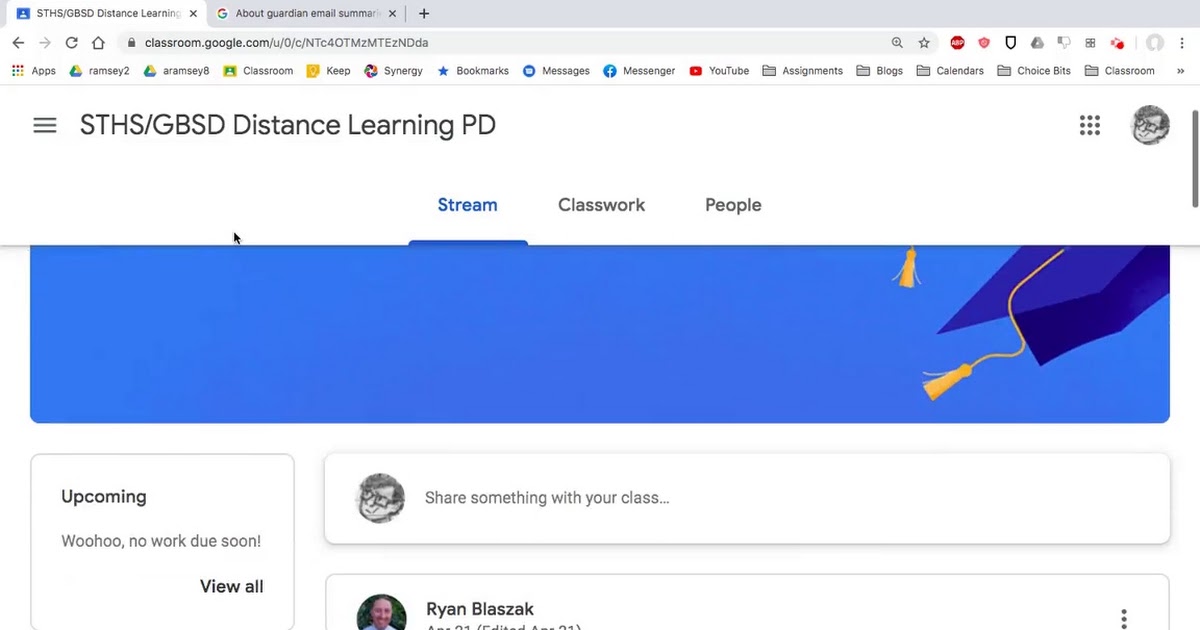
    Google Classroom Overview Google Classroom Overview

    Watch the videos below to get a helpful overview of Google Classroom, from both the student and parent perspective. NOTE: If you are not receiving parent updates via email and would like to, please contact Erin Norden at norden@gresham.k12.or.us or 503.261.4600 and we will confirm your email in our system and help get you set up!

    STHS Google Classroom Tutorial from Mr. Ramsey STHS Google Classroom Tutorial from Mr. Ramsey

    Navigating Google Classroom.webm

    Navigating Google Classroom.webm

    launch drive.google.com

    Google Classrooom 101 Video Google Classrooom 101 Video

    Google Classroom 101 for Students & Parent/Guardians
    zoom_out_map

    Report Cards Online

    Parents, did you know you can access your student's progress reports and report cards online through ParentVue? To access the report card from your ParentVue account, just click on the 'report card' button on the left side. Paper report cards will be available by request only. If you have trouble logging into your ParentVue account or need to get it set up, please contact Koryna Herreid at 503-261-4600 or Herreid@gresham.k12.or.us.

    zoom_out_map

    Volunteering

    Interested in Volunteering at STHS for the 20-21 school year?


    1) Go to the district website at www.gresham.k12.or.us

    2) Hover over “About Us” and click on “Volunteer Information”

    3) In the left-hand menu, click on “Volunteer Application Form”

    4) Fill out the online application

    5) Record your volunteer badge number


    Once completed, the approval process can take up to two weeks.

    Happy volunteering!

    NOTE: The application is not mobile compatible. This must be done on a laptop or desktop computer.

    zoom_out_map

    Springwater Attendance

    If your son/daughter is struggling with distance learning for any reason, please reach out to your student's teacher or the office (503-261-4600) so we can help create a solution. Teachers are also tracking weekly participation and engagement. If you student receives a "NC" (Needs Contact), someone from our school will reach out to you.

    zoom_out_map

    Electronic Flyers

    Gresham-Barlow Distict has launched a new electronic flyer tool called “Peachjar.” This service allows us to “go green” and will ensure that every flier is delivered to each household. Peachjar will provide flyers directly to your computer, tablet or mobile device.


    To view school-approved flyers, simply click the Peachjar button on your school’s website.

    zoom_out_map

    Upcoming Events

    For a list of upcoming events, visit the Springwater Trail High School Website and click on view calendar on the right side of the screen.
    zoom_out_map

    PARENTVUE

    Gresham-Barlow School District’s ParentVUE provides parents and guardians access to information regarding their children’s demographic information, attendance activity, reporting period grades and class schedules via the Internet. You may login to ParentVUE using the link on the Parent Resources Page. If you need assistance logging into your ParentVUE account, please contact the Office at 503-261-4600.
    Loading indicator

    close

    Created with

    Communicate quickly and effectively with interactive newsletters.

    Smore empowers educators to connect with their community, streamline school communications,
    and increase engagement.

    Create a newsletter