
remove_red_eye 476
page background

Voice Typing

Tech Tip Tuesday (January 14, 2024)

Voice Typing Tech Tip Tuesday (January 14, 2024)
Voice TypingTech Tip Tuesday (January 14, 2024)
Bruce Almighty GIF
zoom_out_map

Why voice type when I've got two nimble hands?

I'm a big proponent for voice typing. Unless I'm in a quiet space that I can't disturb others, I am voice typing. My brain is cooking it up faster than I can dictate it and quicker than Grammarly can correct it.


Here's why it's helpful for you:


1. Increased Speed and Efficiency

  • Speaking is often much faster than typing, making it ideal for drafting lengthy documents, capturing ideas quickly, or multitasking, especially when brainstorming or transcribing.

2. Hands-Free Productivity

  • Allows you to work while performing other tasks.
  • Enables you to interact with devices without needing a keyboard, enhancing flexibility in different environments.

3. Ergonomic Relief

  • Reduces strain on wrists, fingers, and hands, minimizing the risk of repetitive strain injuries like carpal tunnel syndrome.
  • Offers a break from typing-intensive tasks, promoting better long-term physical health.


You can do it on all of your work devices! Check out below how to use voice typing on Windows, Mac, and Chromebook! All of them work on simple shortcuts that you can memorize easily!

Chromebook logo
open_in_new zoom_out_map

Chromebook

Link to instructions

Windows logo
open_in_new zoom_out_map

Windows

Link to instructions

mac logo
open_in_new zoom_out_map

Mac

Link to instructions

But how can it help my students?

  1. Increased writing fluency: Voice typing can help students write faster and more easily, overcoming writer's block and capturing ideas more efficiently.
  2. Improved accessibility: Voice typing can be a significant aid for students with disabilities, such as physical disabilities or learning disabilities, as well as English Language Learners.
  3. Enhanced creativity and note-taking: Voice typing can facilitate brainstorming, improve note-taking accuracy, and encourage more fluid and expressive writing, especially when their verbal vocabulary skills don't match their simple writing style.
Need help with students and voice typing?
I'm always happy to work with students directly or help you support your students if you would like to use it more!
Resource of the Week
Caption GIF
zoom_out_map

Enhance learning accessibility with Caption Ninja for free!

Unlock the potential of your classroom with Caption.Ninja! This innovative tool enables teachers to easily create engaging AND translated captions for videos and presentations, making learning more inclusive for all students. By incorporating captions, educators can enhance comprehension, support diverse learning styles, and foster an environment where every voice is heard. Caption.Ninja is offered as a free project run off of GitHub for all to use!


Captions are necessary for for the Deaf and hard-of-hearing community, and it helps promote a more inclusive classroom for all learners!

CAPTION.Ninja

This is a free-to-use captioning tool for OBS. Speech-to-text is done using Machine Learning

launch caption.ninja
The Changelog

4 updates from the good ol' Google Workspace for Education! 4 updates from the good ol' Google Workspace for Education!

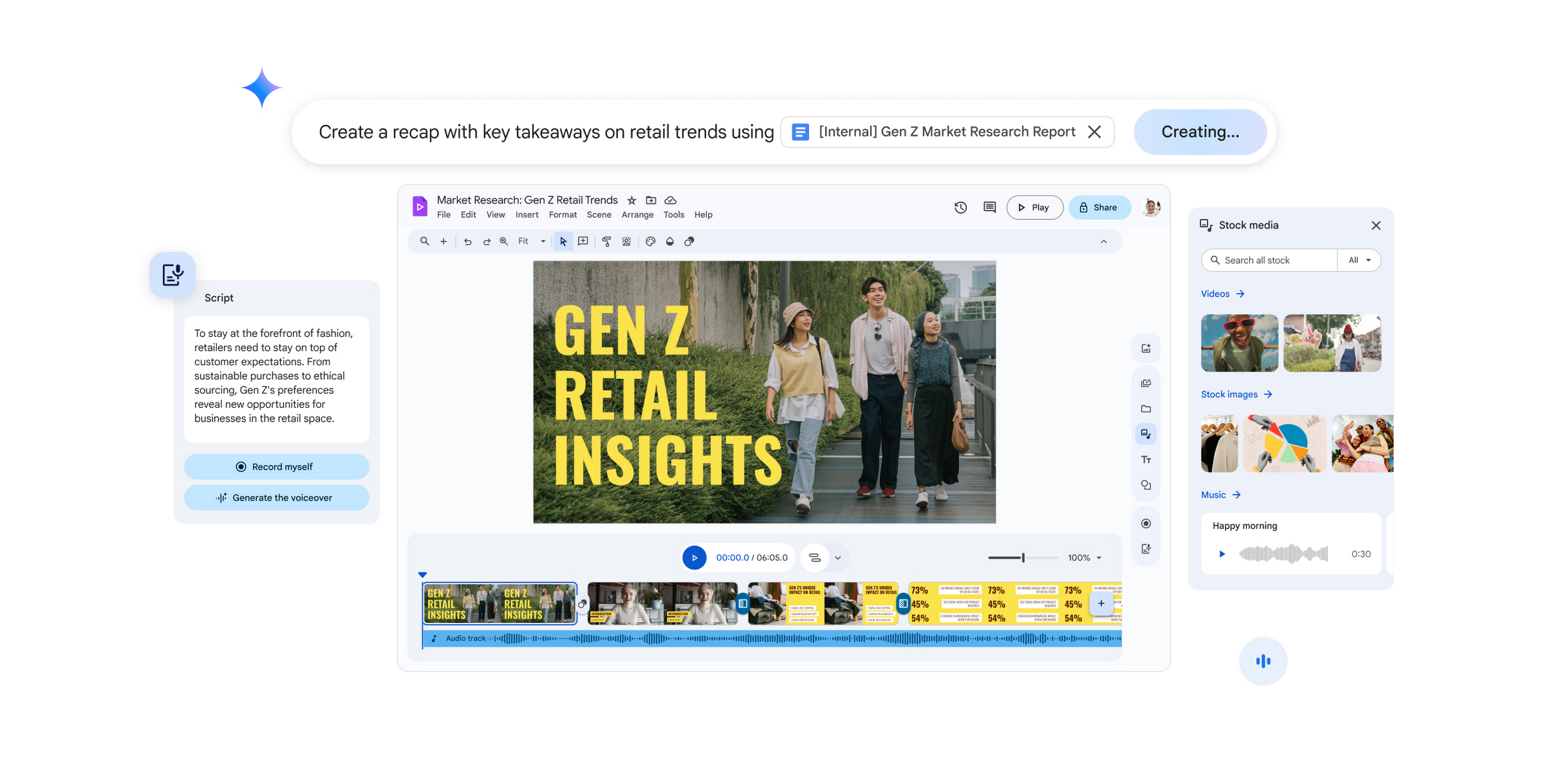
Create, share, and discuss with Google Vids!

Google Vids is a video creation tool within the Google Workspace that can help students by simplifying video projects, boosting creativity, improving presentation skills, and increasing engagement in learning through interactive video-based projects.


**Available to Education Plus only at this time (FSD145 is a Education Plus subscriber).

Google Vids brings the power of AI to video creation | Google Workspace Blog

Google Vids brings the power of AI to video creation | Google Workspace Blog

Learn how Google Vids makes it easy for anyone to create professional videos

launch workspace.google.com

Create simpler with updated templates within Slides and Docs

It's been a while since Google has rolled out new templates within their galleries, but there are new premade templates that are ready to use for any Google Workspace user!

Build high-quality, modern documents faster in Google Docs with 40 new templates

Build high-quality, modern documents faster in Google Docs with 40 new templates

Update [December 18, 2024] We have updated the rollout information for this feature. See the Rollout section below for more details. What's...

launch workspaceupdates.googleblog.com
Introducing a refreshed library of high-quality Google Slides templates that elevate your presentations

Introducing a refreshed library of high-quality Google Slides templates that elevate your presentations

What's changing We're introducing a new collection of modern, professionally designed templates in Google Slides to help users build presen...

launch workspaceupdates.googleblog.com

Find facts easier in the Age of Knowledge with Google Scholar!

We have the information, but how do we use it?

Google Scholar is a simple way for students to use academic research easily!

20 things you didn't know about Google Scholar

20 things you didn't know about Google Scholar

Google Scholar celebrates two decades of breaking down barriers to academic research and making it accessible to everyone, everywhere.

launch blog.google

I don't need everyone to respond to my Google Form!

Google Forms are wonderful for capturing responses, but sometimes, an email circulation list include folks that don't need to respond to a Google Form. Now, you can set granular controls to decide who can respond to a Form, limiting the outreach of a Form (in a good way!).

Adding granular control options for who can respond to Google Forms

Adding granular control options for who can respond to Google Forms

What's changing Last year, we ​​introduced a beta that gives Google Forms creators more granular control over who can respond to their form...

launch workspaceupdates.googleblog.com
Want all of the updates?
Check out the updates directly from the source in this Google Slides presentation.
Where is Brian?
January 13-17
open_in_new zoom_out_map
Let's plan and work together!
I'll be in those buildings, but my availability may vary.
Let's schedule a time to collaborate that fits your schedule perfectly.
January 20-24
open_in_new zoom_out_map
Dad joke GIF
zoom_out_map

Where should you keep your money in January?

In a slush fund!


Made by MagicSchool.ai Teacher Joke Generator

zoom_out_map

Brian Krause, Instructional Technology Coach

Contact me to collaborate on your next project, troubleshoot what you do currently, or to just answer a question you have!

Email: bkrause@ltcillinois.org
Booking Link: https://calendly.com/bkrauseltc
Work Cell Phone: (815) 362-4791
Twitter: @bmkeducation

Schedule a time together!
Tech Tip Tuesday
open_in_new zoom_out_map

Want to catch up on the old tips?

Click here or below for an archive of all Tech Tip Tuesday newsletters.

My Newsletters | Smore

launch smore.com
Make today tolerable!
Thanks for reading!
Loading indicator

close
Powered by