


It is better than a phone call. It is better than an email. And it is better than a text.
The ticket system. It's true.
If you feel like you have a direct line to someone, I'm going to gently and kindly remind you... the tech ticket system is the way to get support. Please use it.
There are many reasons for this, but a few that are most relevant to you might be that
(a) it helps us see patterns in issues, so can see how widespread a problem may be
'it looks like *insert issue* is a problem at *insert particular school*, I'm seeing 5 tickets from that school specifically, but not others'.
and
(b) everyone in the dept can see the ticket request so you get the fastest service.
Many people have many skills and they can group issues to be efficient
'oh, wow, 5 people need *insert same issue*. Let me get in the the *insert the place* and fix those all at once' . Compare this to 5 emails/texts to 5 different technicians. Crazy, right?
And, to be clear, if you direct text/email/call, there is the real possibility that the person you chose to contact isn't the person who will solve the problem, so not only is it going to take longer to get you help, you are taking the person you contact away from work they are doing. The ticket system avoids this inefficient process. Please just put in the ticket.
note from me (Liz): I feel like I need to add that I am talking about the whole tech department of 12 people. I *do* work by email, and many times I answer the question you ask. You guys-- I mean, you all-- are super understanding when am not able to answer your question from a teacher view, and so I reply "I can't help with that, can you put in a ticket?" That's fine. Email me.
This is a request from the *tech department*, not a request from just me.
Tickets, folks. Tickets.

Did you know this week is WORLD READ ALOUD DAY?
So, recognize World Read Aloud Day soon! Record yourself reading one of your favorite books and send it to your students! Or find a story from Storyline Online. Did you know there are activity guides to go with each story? Take advantage of those to help you ask meaningful questions!
Can I share one of my favorites with you---- As Fast As Words Could Fly by Pamela M. Tuck.
https://www.storylineonline.net/books/fast-words-fly/
Want to address Black History Month, teach about Brown vs. the Board of Education, introduce this old tool called a typewriter, and share an example of grit and the power of action? Here is a video you might like.


Just for TK-2 teachers--- Happy Numbers idea
When you are signed into the Dashboard (click Happy Numbers when you are signed into Clever), follow these steps and it will be available for your students.
* Click Control Panel at the top
* Click the Assessment Tests tab
* Check the box by Mid Year Test column
* Click the calendar and choose the dates you want it to be accessible to your students
This can generate one more point of data that might be helpful to you. Again, I'm not in charge of anything, I'm just sharing with you that we learned it is there if it is something that would help you. And thanks to Katya the Fantastic for sharing! If you know her, you are better for it, like I am!


But here is something you might not know.... the game for Paras opened this week.
It is very similar to the teacher game, but includes more "what it looks like to students" and much more baby step information, because our paras have never had access to the same TST type training the teachers have. I am writing many of these activities specifically for them.
It has taken me awhile to get to this, but it is something very important to me.
TEACHERS--- Invite your classroom paras--- it is specifically designed for them--- and let me know what kinds of things they need to learn so I can use my time in a way that is helpful to them.... crazy idea, I know!
PARAPROFESSIONALS--- you are so valuable to our students! Come play COAST and learn things that will help you confidently use the technology they need right now! You should have an email, or contact your principal and they can get you the info.
(or, go to bit.ly/hesdcoast--- this video will show you what signing in will look like---https://youtu.be/3AX0oFy_kcg)

COAST Surf Shack

Laptop stand


Eduprotocols Resource
Because an Eduprotocol is an accessible idea. There are so many great lesson strategies on the internet, but I know it can feel overwhelming. All your students have devices to use with access to Google Tools. Why not teach them a learning strategy that is fun and that you can re-use with different content? Everything in the Eduprotocol philosophy aligns with what we want as teachers.
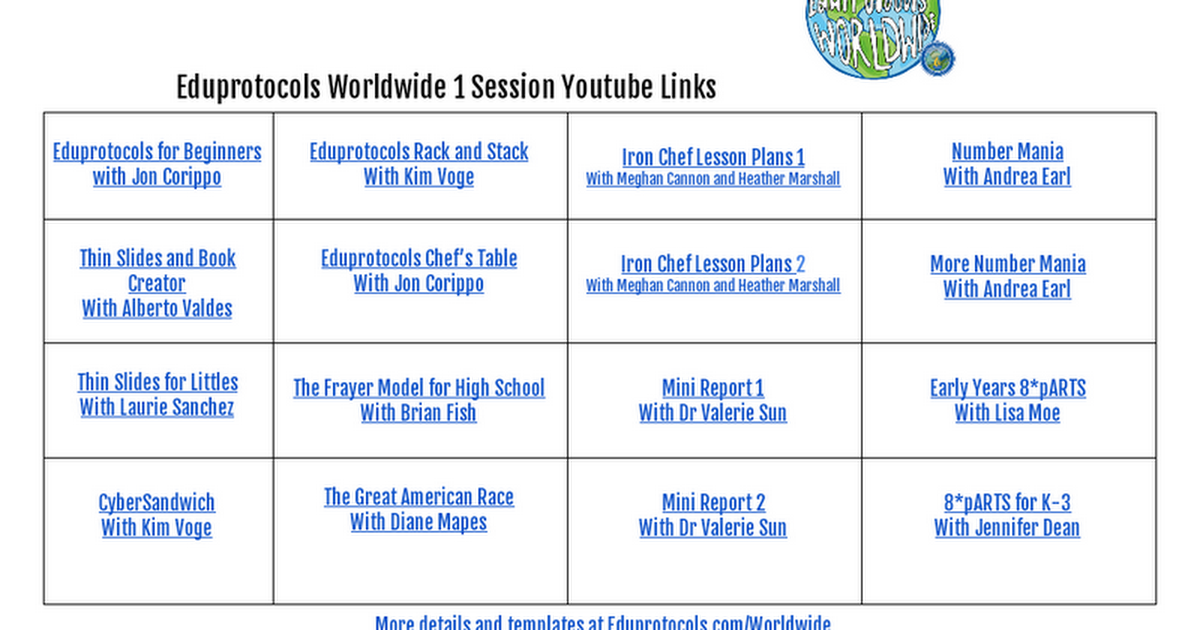
Did you watch any of the short EduProtocol videos last month? Here they are again in case you didn't get a chance..
Here you go ! Let me know what you think!


Liz Hoppe, technology resource specialist
Email: lhoppe@hueneme.org
Website: www.hueneme.org
Location: The Hueneme Tech Lab
Phone: 805-488-3588 9832
Twitter: @hoppeteacher