

Northwood Notes
Royal Oak Schools: A Community of Excellence
Dear Northwood Families,
I am excited to start my second year as the principal of Northwood Elementary School. If you would've asked me at the beginning of my career if I was prepared to deal with a pandemic that would shut down our physical facilities and move us to an online platform to end and start a school year I would have said, "that's crazy!"
However, circumstances change and here we are about to start another amazing school year. We have an incredible community of parents, students and staff ready for the challenge.
Our commitment to the Northwood community is to work hard every day to provide our students the best in all areas. We will have moments of failure and struggle but this will only make us stronger. We are looking forward to the opportunity to work with all of you to kick off another fantastic year filled with unique memories.
We look forward to seeing you during our Meet and Greets (DK and K) and our Beep and Greets (1st-5th) next week!
Sincerely,
Jennifer Knipper
Northwood Virtual Staff Tour
Welcome to the 2020-2021 school year at Northwood!
Enjoy our virtual tour below to get to know our staff!

Remote Learning Permissions
Just a reminder: In order to have students participate in virtual learning we need you to complete the Remote Learning Permissions form by the first day of school. Here is the link:
Canvas Step by Step Guide for Elementary Parents
We are providing this guide for our youngest learners so they have the time to practice logging in. Secondary students will be receiving this information next week from their teachers.
If you are having trouble logging into canvas don't panic! Our teachers have provided you with the live links you need for the first few days and will be spending the first week teaching our students how to login and how to navigate Canvas. It is not necessary to join your live meeting vis Canvas the first week.
How to find your student’s email address and password for Canvas
1: Login to your Mistar Parent Portal
Please note: If you do not know how login to your MiStar Parent Portal follow a-f below.
a.. Login to the district site
b.. Click Parents/Login to Mistar parent portal
C. It prompts them for your pin and password
d. Directly beneath that it says Need my login information
e. Click on that link
f. Next a box pops up where you can enter your email address and the system will send
it to you.
2: Click on your child’s name
3. On the left hand side column click on Network Login this is where you will find their Royal Oak Schools Network email and password.
Parents can reset their child's network password by calling the Help Desk at 248.209.2060 or visiting https://password.oakland.k12.mi.us/
Canvas Login Directions for Students
Input your student’s Royal Oak Schools Network email and password
Virtual Academy Login Directions for Students
Use the Google Single Sign On feature under the login boxes and use Royal Oak Schools Network email and password
ADDITIONAL SUPPORT TOOLS for TRADITIONAL ONLINE STUDENTS ONLY (NOT VA):
*Virtual Academy tutorials will come from teachers.
Drive By Beep and Greet
We wanted to offer you an opportunity for you and your child to meet your child's teacher prior to the start of the school year. In order to do this in a safe manner, we are going to do a drive by Beep & Greet in the drop off lane of our parking lot. Classroom teachers and other staff members will be outside to say "hello" and provide information and some materials for your child.
Directions for the "drive thru"
Families should follow the directions of staff as they enter the school driveway.
Once you enter the parking lot, there will be teacher stations with large signs on them. Following the traffic pattern, drive to the appropriate station.
Once there, you can say hello and get your materials from your teacher.
Continue on towards the exit!
Here is the schedule for our Drive By Meet & Greet:
Tuesday, September 8
8:30-10:30: DK & KDG (on campus)
11:00-1:00: 1st Grade
1:30-3:30: 2nd Grade
Wednesday, September 9
8:30-10:30: 3rd Grade
11:00-1:00: 4th Grade
1:30-3:30: 5th Grade
Safety precautions:
In order to ensure the safety and well being of every student, staff member, and family member please adhere to the following guidelines:
If you are sick (temperature of 100F, cough, shortness of breath) or if you have been asked to self isolate or quarantine- please do not come and we will work together to ensure your child receives his/her materials.
All staff will be wearing masks.
Students and families must remain in their cars, and should adhere to social distancing throughout the process.
Library Book Drop Off
Weekly Material Pick Up
- Hours are 1:00-3:30 on Fridays. You may send a friend, neighbor, babysitter etc. to pick up materials during this time. If you absolutely can not make this time please contact your child's teacher to make arrangements.
- Come to either Door 2 or Door 6 (North Playground)
- Please have your child's name, assigned number and teacher's name on a piece of paper to hand to our staff and volunteers.
- Maintain social distancing guidelines and please wear a mask.
MATERIAL PICK UP IS ONLY NECESSARY IF YOUR TEACHER HAS INDICATED YOU NEED TO PICK UP MATERIALS.
Special Education News
Special Education Program Updates
Chromebook Needs
If you are in need of a computer device for your child, Royal Oak Schools can provide a Chromebook. Please complete the survey at the link below.
If you have already requested a chromebook but have yet to receive it, don't worry you will be hearing from us soon about how and when that will happen. If you filled out the survey before the first deadline of 8/18 and you and were unable to pick up your device during the designated times you will receive it at the beep and greets. Our tech department is working very hard to get everyone what they need. Don't worry, instruction will be very flexible the first week as we know not everyone has a device yet.
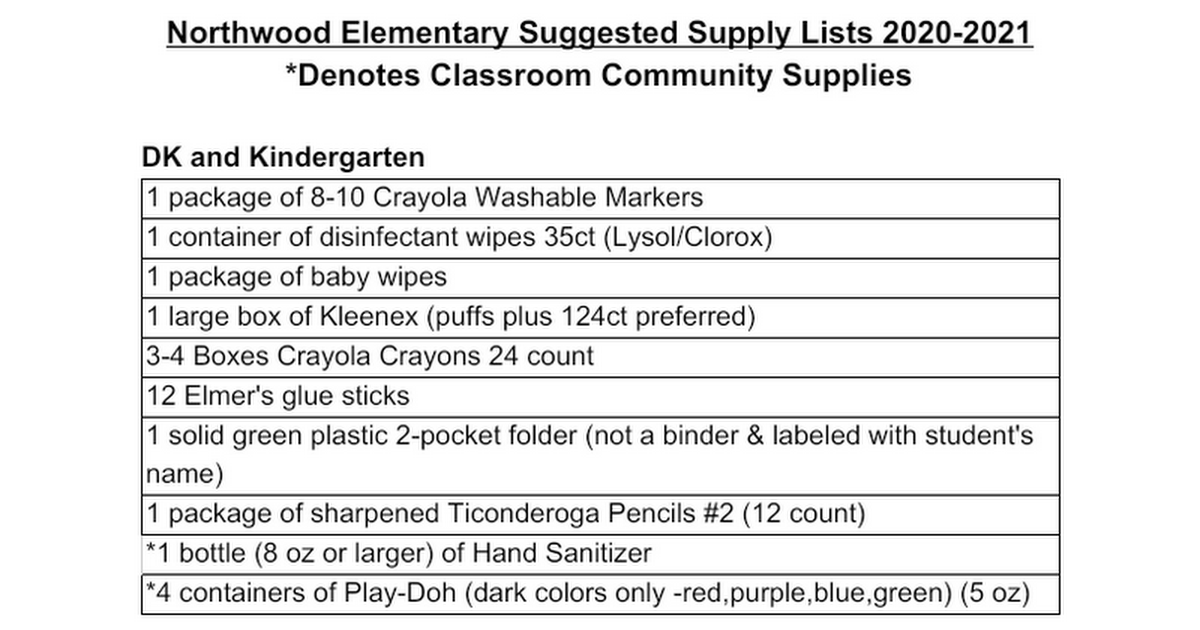
Suggested Supply List
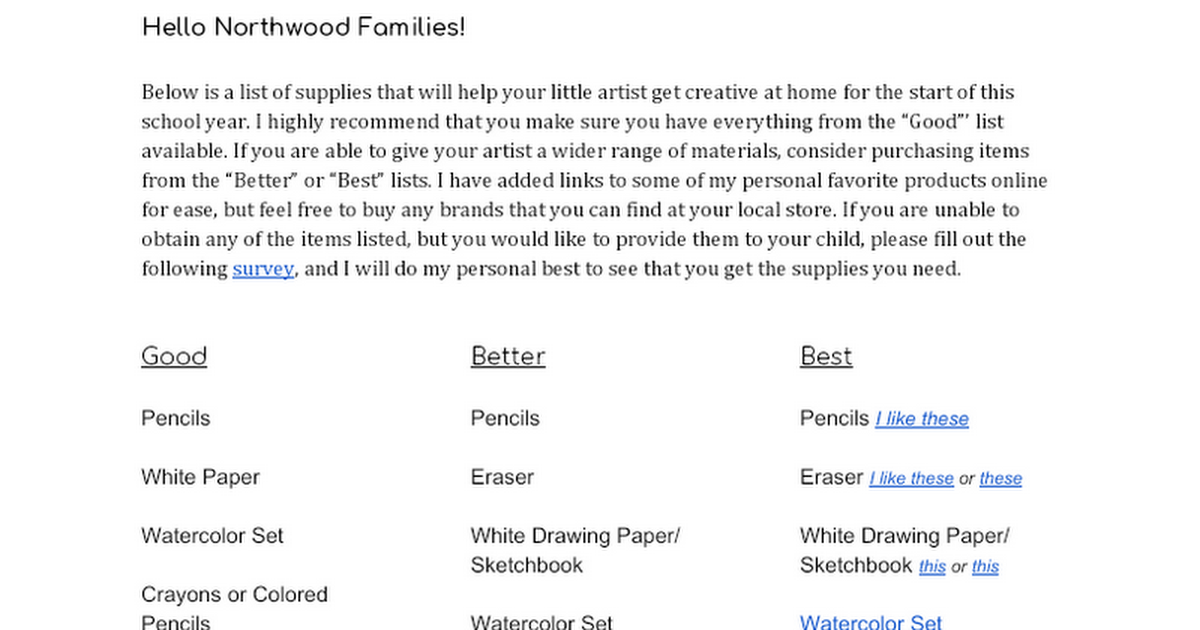
Art Suggested Supply List
Blessings in a Backpack
In light of the tough economic times facing our area, we are attempting to help Royal Oak Schools families by making sure that all of our children have enough food. “Blessings in a Backpack” is a program designed to provide students on the free and reduced lunch program with enough food for three meals a day during the weekends. This program, sponsored by Community Foundation of Greater Rochester and the Meijer Corporation, is active in Royal Oak Schools. If you agree to take part in this program during the school year, your child will receive a bag every Friday filled with food for the weekend. While we are remote, the food will be delivered to your home by volunteers. The simple meals may include food like macaroni and cheese, beef ravioli, canned fruit, granola bars, peanut butter, soups, juice and other items.

