remove_red_eye 355
page background

Digital or Physical?

Tech Tip Tuesday (April 29, 2025)

Digital or Physical? Tech Tip Tuesday (April 29, 2025)
Digital or Physical?Tech Tip Tuesday (April 29, 2025)

As summer approaches and the Spring Equinox of March 20 fades further into the past, gaining the sunlight we happily let blind us in the rearview mirror during our commutes, our excitement for the year's end and the start of the next ebbs, flows, and grows.


A never-ending, existential problem of there being issues with the Wi-Fi or the jammed copier always exists, and the question remains: do I have students do this on paper or on the computer?

What about learning? What about learning?

The debate between paper and digital materials in K-12 education centers on learning outcomes, student engagement, accessibility, and practical classroom concerns.


Click to expand to view on Canva

 A comparison chart titled "Paper or Digital?" created by Brian Krause for LTC. The chart compares Paper-based Learning and Digital Learning across five features: Comprehension & Retention, Focus, Engagement & Convenience, Equity, and Environmental Impact.   - **Paper-based Learning** shows:     - Higher comprehension for deep reading and review.     - Fewer distractions, better engagement.     - Tangible but less interactive; requires physical storage and is heavier.     - No technology barriers.     - Uses paper and printing.   - **Digital Learning** shows:     - Lower comprehension for long texts, but provides explainers and vocabulary support.     - More distractions and passive engagement.     - Highly interactive, customizable; lightweight with many resources.     - Digital divide concerns.     - Reduces paper use but devices have associated costs.
open_in_new zoom_out_map

Well, which do I choose? Well, which do I choose?

Both formats offer unique advantages and drawbacks, and research increasingly suggests that a blended learning approach may provide the greatest learning benefit to students.

  • Offers flexibility and personalization for diverse learners

  • Increases student engagement and achievement

  • Enables individualized support and differentiation

  • Empowers teachers with new skills and reduces workload

  • Supports effective classroom management and assessment

A logo for "Retro Report in the Classroom" features the word "RETRO" in large yellow sans-serif letters stacked above the word "REPORT" in equally large black sans-serif letters. Below "REPORT" and in smaller blue sans-serif letters is the phrase "IN THE CLASSROOM". A blue graduation cap is positioned above and slightly to the left of the word "RETRO".
open_in_new zoom_out_map

Connecting the Past to the Present Truthfully

Retro Report has produced over free 250 short documentaries and video series in collaboration with renowned partners such as The New York Times, PBS, The New Yorker, VICE, Scientific American, NBC News, Politico, Time, The Guardian, Univision, and more. All documentaries come with accompanying resources for classroom discussion and assessment.


Their mission blends compelling, reliable journalism with history, civics, and media literacy education. By doing so they are helping to combat the information crisis by:

  • Revitalizing history and civics education with engaging, real-world examples.
  • Delivering nonpartisan, fact-based journalism to build trust in media.
  • Equipping educators with innovative media literacy tools to empower students to analyze and assess information critically.


For K–12 teachers (and everyone), their resources provide adaptable, classroom-ready materials designed to spark curiosity, inspire informed discussions, and foster critical thinking in students.

Also again, free to use without any copyright issues.
Note: Retro Report resources are not CCSS or IL S.S-aligned and would need adapting if using for those purposes.
Retro Report Documentaries and Classroom Resources
Amid widespread misinformation and debates over facts, Retro Report creates trusted documentaries and classroom resources adapted from reputable sources to foster understanding, combat misinformation, and inspire inquiry.

💰 I mean..we all need money. 💰 💰 I mean..we all need money. 💰

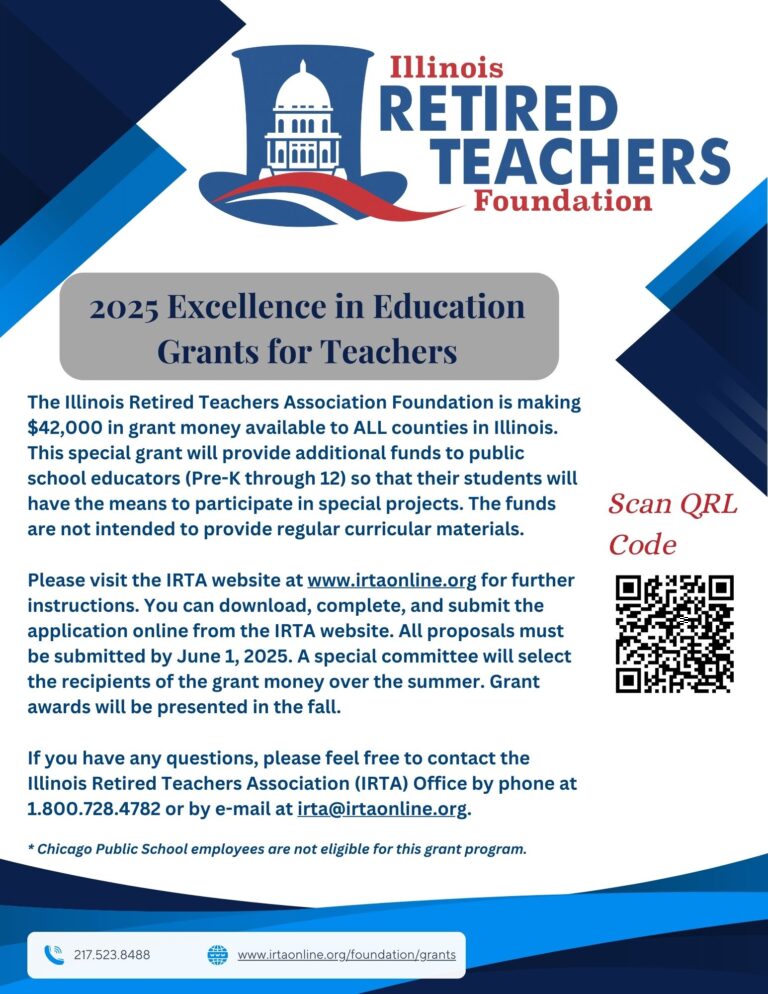
Apply for an IRTA grant for your classroom! Apply for an IRTA grant for your classroom!

More info in the link! More info in the link!

Grants - Illinois Retired Teachers Association

Grants - Illinois Retired Teachers Association

The Illinois Retired Teachers Association Foundation offers a series of programs and grants for retired and current teachers. Learn more about IRTA grants.

launch irtaonline.org
IRTA Grant Form
1 page application, $750 maximum, due on June 1, 2025
The image is a weekly schedule for April 28–May 2, presented in a colorful and structured layout. Below is a detailed description:  - **Top Header:**   - The word "Schedule" is displayed in large, white text with a purple gradient background.   - The background features abstract blue waves and curved lines for decoration.  - **Daily Schedule Columns:**   - Each weekday is represented as a column with specific icons and text:     - **Monday:**       - AM: Freeport Middle School (orange knot logo with "Freeport Middle School").       - PM: Center Elementary School (yellow circle logo with "Center Elementary School").     - **Tuesday:**       - AM: Jones Farrar IB World School (owl mascot logo with "Jones Farrar IB World School").       - PM: Blackhawk Elementary School (hawk mascot logo with "Blackhawk Elementary School").     - **Wednesday:**       - Freeport School District Hub (orange heart logo with "Freeport School District Hub").       - Text below indicates "Available for all schools and departments."     - **Thursday:**       - AM: Carl Sandburg School (orange knot logo with "Carl Sandburg School").       - PM: Placeholder icons with "000" displayed twice.     - **Friday:**       - Out of Office (green and red icons with "Out of Office" written in white text on a blue background).  - **Footer Section:**   - At the bottom center, the date "April 28–May 2" is displayed in bold, inside a rounded blue rectangle.   - A small box in the bottom right corner reads, "I'm always available for a virtual meeting!" in white text with a black background.  The design is clean, organized, and visually appealing, combining icons, text, and a soft color palette to convey information effectively.
open_in_new zoom_out_map
Make a meeting. Make it happen!
I'll be in those buildings, but my availability may vary.
Let's schedule a time to collaborate that fits your schedule perfectly.
The image is a weekly schedule from May 5–9, presented in a colorful layout. Below is a detailed description:  - **Top Header:**   - The word "Schedule" is written in large, white text with a purple gradient background.   - The background features abstract blue waves and curved lines.  - **Daily Schedule Columns:**   - Each weekday is represented by a column with a specific logo and text details:     - **Monday:**        - AM: Freeport Middle School (orange knot logo with the text "Freeport Middle School").       - PM: Center Elementary School (yellow circle logo with the text "Center Elementary School").     - **Tuesday:**        - AM: Jones Farrar IB World School (owl mascot logo with the text "Jones Farrar IB World School").       - PM: Blackhawk Elementary School (hawk mascot logo with the text "Blackhawk Elementary School").     - **Wednesday:**        - Freeport School District Hub (orange heart logo with "Freeport School District Hub").       - Text below indicates "Available for all schools and departments."     - **Thursday:**        - AM: Carl Sandburg School (orange knot logo with "Carl Sandburg School").       - PM: Lincoln-Douglas Elementary School (red lion logo with "Lincoln-Douglas Elementary School").     - **Friday:**        - Out of Town Staff Meeting (LTC logo with dark blue background and white text).  - **Footer Section:**   - At the bottom center, the date "May 5–9" is displayed in a bold font inside a rounded blue rectangle.   - A small box in the bottom right corner says, "I'm always available for a virtual meeting!" in white text with a black background.  The overall design style is clean, organized, and visually engaging, with a mix of icons and text.
open_in_new zoom_out_map
Dad joke GIF
zoom_out_map

Where did the orca go for summer vacation?

Wales!


Made by MagicSchool.ai Teacher Joke Generator

zoom_out_map

Brian Krause, Instructional Technology Coach

Contact me to collaborate on your next project, troubleshoot what you do currently, or to just answer a question you have!

Email: bkrause@ltcillinois.org
Booking Link: https://calendly.com/bkrauseltc
Work Cell Phone: (815) 362-4791
Twitter: @bmkeducation

Always happy to meet!
Choose a time here that works best for your schedule!
Tech Tip Tuesday
open_in_new zoom_out_map

Want to catch up on the old tips?

Click here or below for an archive of all Tech Tip Tuesday newsletters.

My Newsletters | Smore

launch smore.com
Make today tolerable!
Thanks for reading!
Loading indicator

close
Powered by