
remove_red_eye 380
page background

Canva and Kami

Tech Tip Tuesday (February 10, 2026)

Canva and Kami Tech Tip Tuesday (February 10, 2026)
Canva and KamiTech Tip Tuesday (February 10, 2026)

You've found (or made) an awesome Canva design,
but you aren’t sure how to make it "interactive" beyond just having students look at it.
Or, you're afraid of them deleting things you don't want them to.
That's real.

Canva's Design Canva's Design

First up is Canva.


Canva is a wonderful place to design all of the things that you need for your educator life. However, it's not always the easiest place for students to be able to interact with, especially if they are brand new to any sort of design platforms like Canva or Adobe.


Need some ideas?

Check out the Canva Learning Library, a vast collection of free educational resources designed to help teachers, students, and creators master visual communication and teach their content.


You can export your design as a PDF or if you have the Kami extension, send it right to Kami from Canva (see link below for more on that!).

"Open with Kami" button in Canva | Kami Help Center

This article will give you step by step details on how to find and use Kami through Canva

launch help.kamiapp.com
Canva Learning Library
The Canva Learning Library offers free, classroom-safe templates and interactive courses to help educators and students with visual communication. It provides ready-to-teach resources.

Kami's Accessibility and Grading Kami's Accessibility and Grading

Enter Kami. By pairing these two, you can turn a beautiful static design into a dynamic learning experience.


Once you have that assignment made in Canva, give students the different simple tools they need to be the best they can. Whether it's drawing their answer, audio transcribing, or a picture dictionary, give them what they need!


Plus, with Kami and an LMS like Schoology, it'll collect everything in one place!

Together, forever Together, forever

Whether it's using assignments or even just getting your first one set up, everyone can always use a refresher on how Kami works in Schoology. There are a few different ways to make assignments in Schoology, using feature control to providing only what students need for that assignment, or the auto-grading Questions tool.


Check out more below!

Schoology | Kami Help Center

Using Kami with Schoology

launch help.kamiapp.com

Want to step up your Canva or Kami game? Want to step up your Canva or Kami game?

Schedule a time!
Click here to make it easy!
User uploaded image
zoom_out_map Show in original size
User uploaded image
zoom_out_map

Primary sources from the National Archives!

DocsTeach was created by the National Archives education division to promote learning with and about the Archive's collection of documents (including text, videos, and photographs). It is a knowledge-centered website that allows users to explore all the available primary sources from the National Archives and share activities with students and peers. Educators can use pre-created activities or create their own activities. There are over 250 lesson activities and 1over 12,000 primary sources available for teachers and students.


Students can also perform their own research on documents and then select and download which ones are most relevant for their research. This research tool can promote critical thinking by allowing students to analyze primary sources and act like historians!

DocsTeach
User uploaded image
zoom_out_map Show in original size

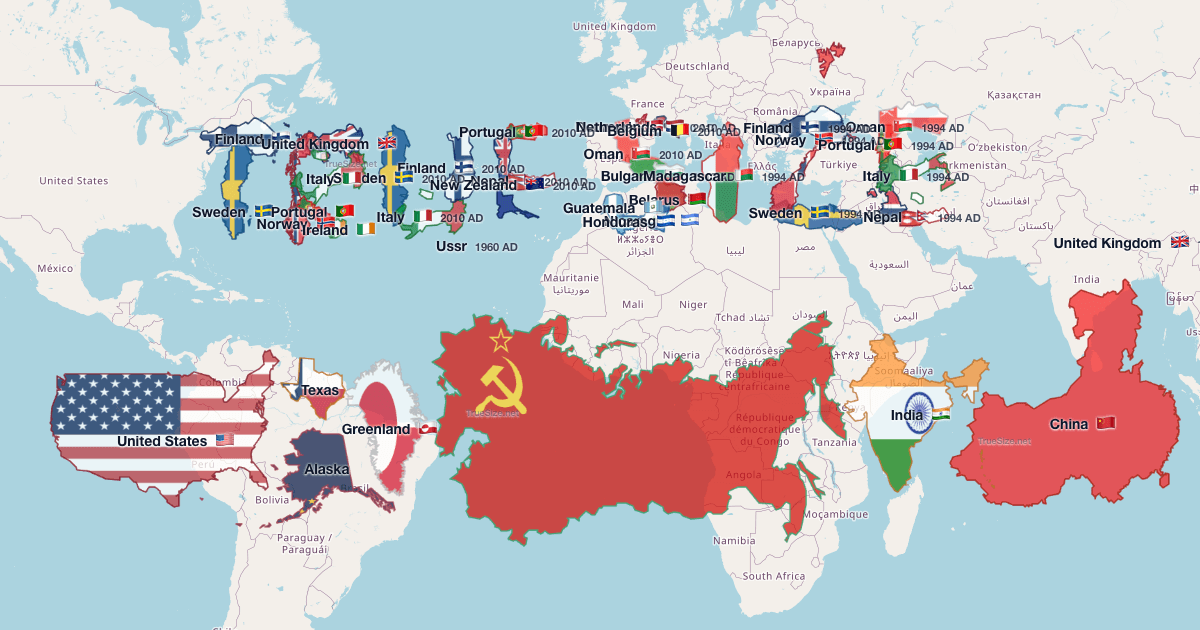
The True Size of Countries is an interactive map that lets you drag countries around the globe to see their real size compared to others. It corrects for Mercator projection distortion.


Use it as a quick visual tool for geography lessons and discussions about map accuracy!

The True Size of Countries | Compare Real Country Sizes

Explore the true size of countries on an interactive map. Compare real country sizes worldwide without Mercator distortion.

launch truesize.net
User uploaded image
zoom_out_map Show in original size
Weekly schedule for the Learning Technology Center (LTC) from February 9–13, featuring IDEACon in Schaumburg on Monday and Tuesday, and various school visits within Freeport School District 145 from Wednesday through Friday.
open_in_new zoom_out_map Show in original size
Schedule a time!
Click here to make it easy!
  A weekly schedule for the Learning Technology Center (LTC) from February 16–20. It lists school visits for various Freeport School District locations, noting a holiday on Monday and open availability on Wednesday.
open_in_new zoom_out_map Show in original size
Alt text: “Animated circular graphic with the Learning Technology Center (LTC) logo in the center, surrounded by rotating blue and black rings. The GIF includes the text ‘Dad Joke of the Week.’”
zoom_out_map

What do you get when you cross a fish with an elephant?

Swimming trunks.


Made with MagicSchool's Teacher Joke Generator

User uploaded image
zoom_out_map

Brian Krause, Instructional Technology Coach

Contact me to collaborate on your next project, troubleshoot what you do currently, or to just answer a question you have!


📧 Email: bkrause@ltcillinois.org
📱 Work Cell Phone: (815) 362-4791
🐥 TwiX: @bmkeducation

Always happy to meet!
Choose a time here that works best for your schedule!
Tech Tip Tuesday
open_in_new zoom_out_map

Want to catch up on the old tips?

Click here or below for an archive of all Tech Tip Tuesday newsletters.
Make today tolerable!
Thanks for reading!
Loading indicator

close
Powered by