Smore logo
remove_red_eye 1.4K
page background

Social Media Best Practices

The Tools, The Rules, The Inspiration

Social Media BestPracticesThe Tools, The Rules, The Inspiration
Advertising Do's and Dont's - New as of 2021
Bianca Sole de Cortes on B.E.S.T advertising practices .mp4
USE THE TOOLS

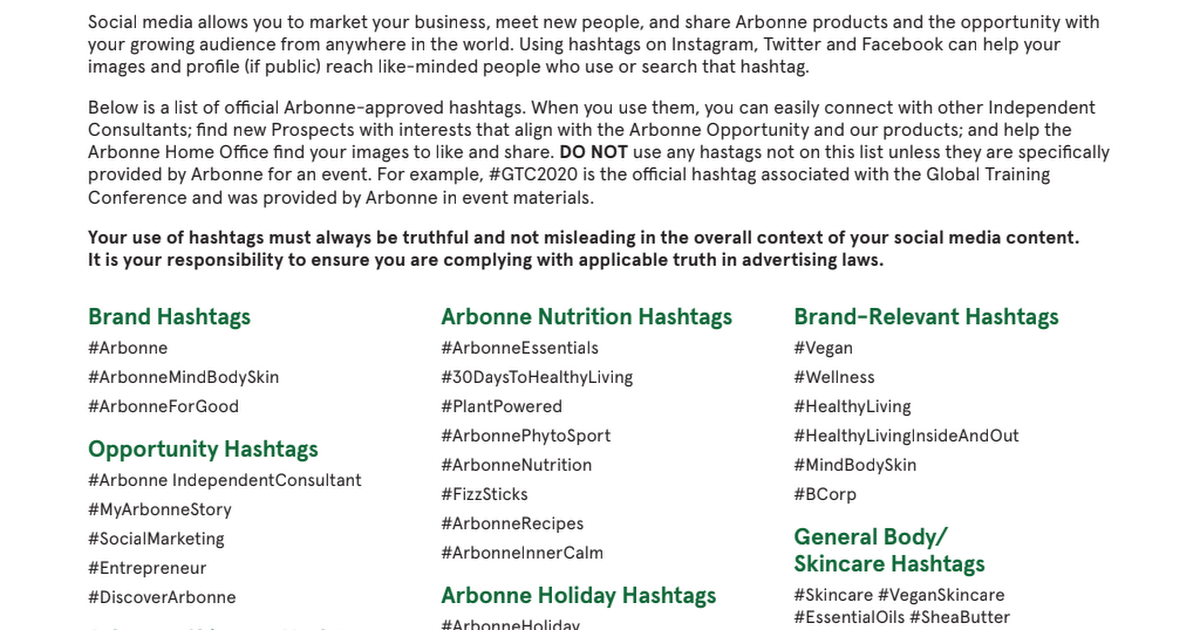
OFFICIAL ARBONNE HASHTAGS OFFICIAL ARBONNE HASHTAGS

CA_OfficialHashtags_SMST_fly_final.pdf

CA_OfficialHashtags_SMST_fly_final.pdf

launch drive.google.com
US_OfficialHashtags_SMST_fly_FINAL.pdf

US_OfficialHashtags_SMST_fly_FINAL.pdf

launch drive.google.com
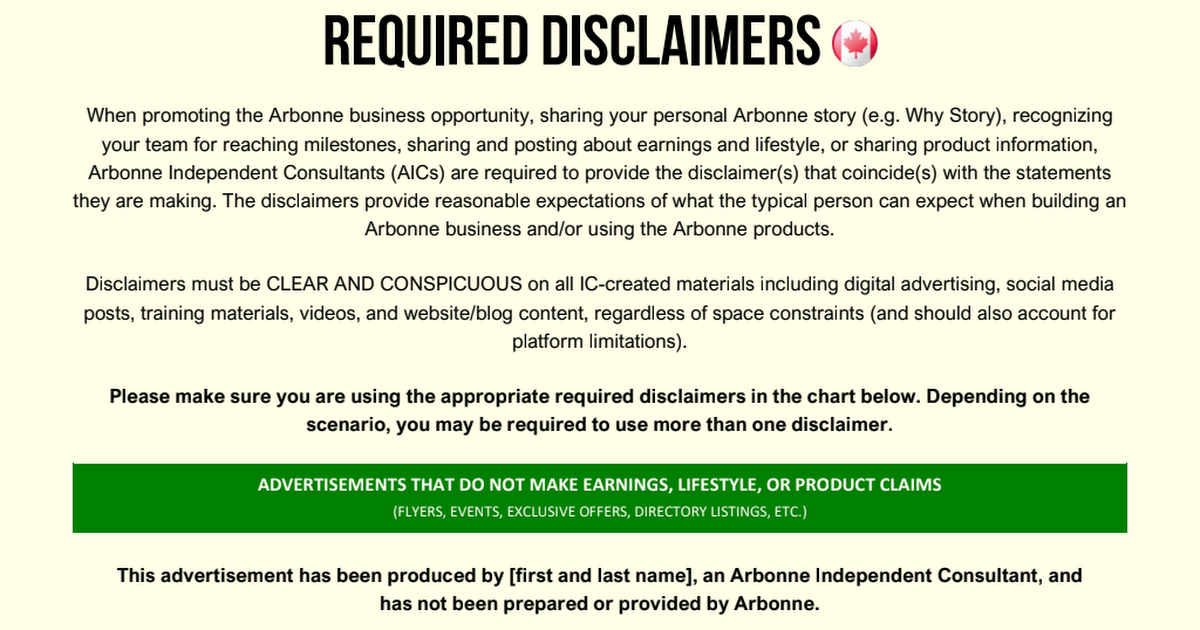
USE REQUIRED DISCLAIMERS
CA_BEST_RequiredDisclaimers_EN_Final.pdf

CA_BEST_RequiredDisclaimers_EN_Final.pdf

launch drive.google.com


When promoting the Arbonne business opportunity, sharing your personal Arbonne story (e.g. Why Story), recognizing your team for reaching milestones, sharing and posting about earnings and lifestyle, or sharing product information, Arbonne Independent Consultants (AICs) are required to provide the disclaimer(s) that coincide(s) with the statements they are making. The disclaimers provide reasonable expectations of what the typical person can expect when building an Arbonne business and/or using the Arbonne products.

Disclaimers must be CLEAR AND CONSPICUOUS on all IC-created materials including digital advertising, social media posts, training materials, videos, and website/blog content, regardless of space constraints (and should also account for platform limitations).

Please make sure you are using the appropriate required disclaimers in the chart below. Depending on the scenario, you may be required to use more than one disclaimer. Please make sure you are using the appropriate required disclaimers in the chart below. Depending on the scenario, you may be required to use more than one disclaimer.

zoom_out_map
zoom_out_map
zoom_out_map

PHOTOFY PHOTOFY

Augment your authentic, real life content with the great tools and graphics found in Photofy. Download the app and use the Arbonne templates.
zoom_out_map
zoom_out_map

DIGITAL TOOLKIT DIGITAL TOOLKIT

Hundreds of gorgeous, classic and monthly updates available for you to create your custom story.

ARBONNE GIFS IN INSTAGRAM STORIES ARBONNE GIFS IN INSTAGRAM STORIES

Add motion and fun to your IG Stories.

Monthly Social Media Inspiration- Every Month Topics for that month are in The Source


Get inspiration for social media posting on Facebook, Instagram, and other social media platforms to help you market your business, connect with new prospects, and grow your business results.

FOLLOW ARBONNE SOCIALS- INTERNATIONAL AND IN YOUR COUNTRY FOLLOW ARBONNE SOCIALS- INTERNATIONAL AND IN YOUR COUNTRY

Like and comment on posts (the number of likes will impress your prospects), Share content or use it as inspiration for your own.
Arbonne

Arbonne

Arbonne, Irvine, CA. 434,292 likes · 6,691 talking about this. We’ve been flourishing for 40 years with the mission of delivering better products that...

launch facebook.com
Arbonne Canada

Arbonne Canada

Arbonne Canada, Mississauga, ON. 73K likes · 896 talking about this. Official Arbonne® Canada page. We’ve been flourishing for 40 years with the...

launch facebook.com
zoom_out_map

Arbonne International Instagram

zoom_out_map

Arbonne Canada Instagram

zoom_out_map

Arbonne UK Instagram

FOLLOW THE RULES

PAID DIGITAL ADS- 4.8 From Policies and Procedures


ICs may choose to use advertising features available on social media and similar platforms. Search engine ads (Google, Bing, Yahoo, and the like) are prohibited.

ICs may pay to boost a post or sponsor an ad on social media by: (1) including the relevant disclaimer listed on the Required Disclaimers tool available on The Source, (2) linking to their personal Arbonne website, and (3) including compliant imagery, the IC logo and/or any other imagery available in the online image library provided by Arbonne. Ad content must be compliant, follow the social selling guidelines, and not mislead the viewer into believing that it was created by the Arbonne Home Office. Additional required guidelines for specific advertising formats are available on The Source.

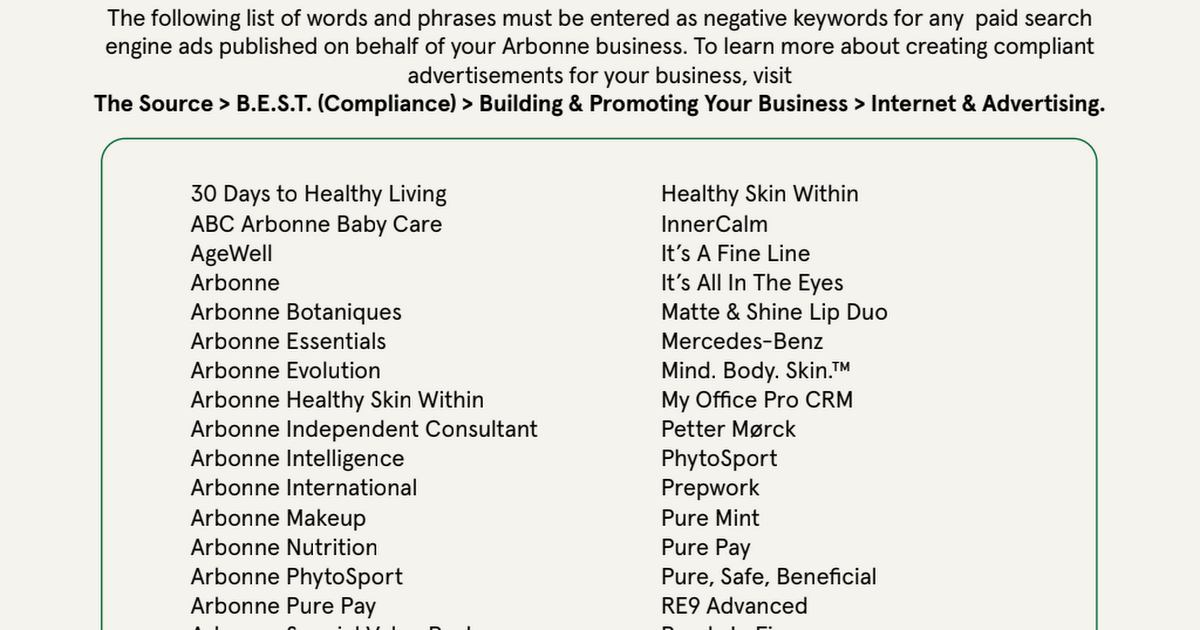
NEGATIVE KEYWORDS LIST NEGATIVE KEYWORDS LIST

The following list of words and phrases must be entered as negative keywords for any paid search engine ads published on behalf of your Arbonne business.

To learn more about creating compliant advertisements for your business, visit

The Source > B.E.S.T. (Compliance) > Building & Promoting Your Business > Internet & Advertising.

2020R01_CA_BEST_NegativeKeywords_FINAL.pdf

2020R01_CA_BEST_NegativeKeywords_FINAL.pdf

launch drive.google.com

SOCIAL CLEAN UP SOCIAL CLEAN UP

CA_BEST_HBIO_SocialCleanUp_fly_final.pdf

CA_BEST_HBIO_SocialCleanUp_fly_final.pdf

launch drive.google.com

SOCIAL CHECKLIST: SHARING YOUR EARNINGS AND LIFESTYLE SOCIAL CHECKLIST: SHARING YOUR EARNINGS AND LIFESTYLE

Social Checklist Sharing Your Earnings and Lifestyle
LEARN FROM THE LEADERS
Connecting Authentically through Social Media
How to Connect Authentically on Social Media with ENVP Arika Hanks
Follow up with Prospects you meet on Social Media
- YouTube

Engaging Prospects Virtually with Social Media Engaging Prospects Virtually with Social Media

CA_EngagingProspectsVirtually_SMST_fly_final_.pdf

CA_EngagingProspectsVirtually_SMST_fly_final_.pdf

launch drive.google.com
Leah Wagner Sharing Arbonne Through Social Media
Leah Wagner Sharing Arbonne Through Social Media UPDATED
Top Tips for Growing Strong on Social Media
Top Tips for Growing Strong on Social Media ENVP Lital Mintz Snir
How to Share your Story on Social- Katherine Terracina
Katherine Terracina How to Share your Story on Social

SOCIAL MEDIA & SALES FOCUS SOCIAL MEDIA & SALES FOCUS

2020R01_CA_FacebookSponsoringFocus_SMST_fly_final.pdf

2020R01_CA_FacebookSponsoringFocus_SMST_fly_final.pdf

launch drive.google.com
How to share your Story on Social-ENVP Maria Spillane
Maria Spillane How to Share your Story on Social
Best Etiquette and posting on Social Media
Best Etiquette and posting on Social Media with ENVP Avery Honeycutt
Top Tips for using Facebook with RVP Cassie Smith
Social Media Success Tips - Facebook with Cassie Smith
HOW TO SHARE 30 DAYS AND YOUR LIFESTYLE IN IG STORIES

ENVP Madeline Griffin ENVP Madeline Griffin

How to share 30 Days and your Lifestyle

LEARN HOW TO USE THE GETTING TO KNOW YOU FORM LEARN HOW TO USE THE GETTING TO KNOW YOU FORM

Find it in the Quick Start Tab in the CRM.

Once you send it to a prospect, and they fill it out, it will be imported into your CRM, with all their contact info including Social links-plus their areas of interest.

GETTING TO KNOW YOU FAQ

Q.Is the Getting to Know You form the best way to add a new prospect to my CRM?

A. It depends on what you prefer but it is a great and easy way to ensure you capture enough information about a new prospect. Remember, if the prospect doesn't already exist in the CRM, the Getting to Know You form will create a new prospect record for you too.


Q.How do I receive the Getting to Know You form once it is sent back to me?

A. The form is not received back in the same format. The lead/prospect's profile Details and Interests tabs will automatically get updated with the information shared in the form.


Q.Do I fill out the Getting to Know You form for my prospects? Or do I send them a link to fill this out?

A. You can do both! The quickest way is to share the form. There are multiple ways to share the Getting to Know You form and send it to your contacts via text, social media, from a tablet at an event, through a short cut to the form on your mobile phone etc.


Q.Can I have a Client/PC/IC fill out the Getting to Know You form?

A. The form was designed for prospects. If you have Clients/PCs/Consultants fill out the form, a new prospect record will be created with the information they provide. You can then merge existing Client/PC/Consultant record with the newly created duplicate prospect record by opening the Client/PC/Consultant profile in CRM and clicking Edit.


Q.Does the CRM automatically group new contacts who submit a GTKY (Getting to Know You) form?

A. Yes - all contacts who filled out the form in the last 30 days can be found from Quick Start "See Who is New" or from within My To-Do > Who is New tab. You can use this list to create a custom group.


Q.What happens when I enter a prospect into the CRM and then that same person fills out the Getting to Know You form? Is there a duplicate prospect record created?

A. If an existing lead or prospect fills out the form, the CRM updates their contact record with the information shared which can be found in their Details and Interests tab.


Q.How do I know when someone has filled out the Getting to Know You form?

A. You will be notified with a follow up task on your My To-Do page for the person you received the form from, and you will be able to find a list of contacts who filled out the form within My To-Do > Who is New tab.

FIND MORE INFORMATION TO HELP YOU PROTECT YOUR BUSINESS
Arbonne

Arbonne

launch best.arbonne.com


Search “social media” on The Source to review tools that can help you conduct your business with best practices.

 Engage with us at facebook.com/arbonnebest to get weekly tips, examples, articles, and more.

 Review additional tools on The Source > B.E.S.T. (Compliance) > Protecting Your Business.

Need help or a second pair of eyes?


Send a request to BEST.arbonne.com!

They are there to protect, not punish you :)

Contact form:


https://www.arbonne.com/discover/customer-service/contact-best.shtml

THIS FIELD TRAINING MATERIAL HAS BEEN PRODUCED BY AN ARBONNE INDEPENDENT CONSULTANT,AND IS NOT OFFICIAL MATERIAL PREPARED OR PROVIDED BY ARBONNE. ARBONNE MAKES NO PROMISES OR GUARANTEES THAT ANY ARBONNE INDEPENDENT CONSULTANT WILL BE FINANCIALLY SUCCESSFUL AS EACH INDEPENDENT CONSULTANT’S RESULTS ARE DEPENDENT ON HIS OR HER OWN SKILL AND EFFORT. earnings.arbonne.com
zoom_out_map
Q.How do I receive the Getting to Know You form once it is sent back to me? A. The form is not received back in the same format. The lead/prospect's profile Details and Interests tabs will automatically get updated with the information shared in the form.
Loading indicator

close

Created with

Communicate quickly and effectively with interactive newsletters.

Smore empowers educators to connect with their community, streamline school communications,
and increase engagement.

Create a newsletter