Smore logo
remove_red_eye 155
Logo

Welcome to Smore with MCIU!!

Improving communication practices in school systems

Smore.com/9vmsp

Goals and Outcomes

zoom_out_map
  1. Introduction to Smore
  2. How to Build a Smore Newsletter
  3. Publishing and Sharing Your Newsletters

How to Smore (Creating Your Newsletter)

Step 1: Create A Newsletter
How to get started with a new Smore template or create from scratch.
Step 2: Getting Started with the Editor
A look around the core functions on the builder screen.
Step 3: Adding Content to Your Newsletter
Deep dive into each Content-type and how it can be used or added.
https://www.smore.com/bdcfp-adding-content

Sharing Your Smore (Publishing to Your Audience)

zoom_out_map

Step 4: Publish Your Newsletter

Notes

  • Publishing means the newsletter will be live, but not publicly accessible until you share the link
  • Newsletter must be published for anyone else to access, review, or edit the newsletter
zoom_out_map

Step 5: Edit & Review Your Work

Best Practices

  • Have a peer review your newsletter before sharing publicly
  • Add newsletter to a shared Smore folder for collaborative editing
  • Review using the "Preview" option to evaluate final product
zoom_out_map

Step 6: Share via Delivery Menu

Most Common
  • Email through Smore (copy paste addresses or build mailing lists)
  • Share newsletter link through internal list serve service
  • Mass Notification Distribution (copy HTML into editor)
  • Embed Code on public website
  • Print/Download a PDF copy

Additional Resources and Tools

Shared Folders Collaboration Feature

Shared Folders Collaboration Feature

3 min 32 sec video

launch smore.wistia.com
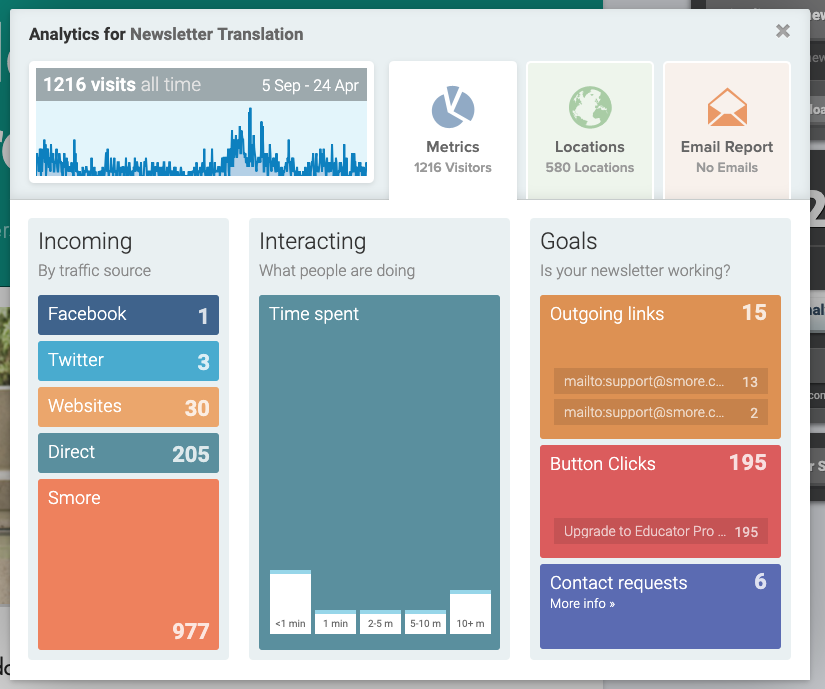
Analytics Overview 📈

Analytics Overview 📈

By carefully studying your Analytics Report, you can gain valuable insights into how your recipients engage with your Smore newsletters and use these insights to improve your engagement rate. The Analytics feature provides insight into who is viewing your newsletter and how they are interacting.

launch help.smore.com
Using Our Templates!

Using Our Templates!

Every month, Smore's Resident Educator creates multiple curated thematic templates to support both school teachers and leaders. Topics range from Women's History Month to Pi Day to recent templates devoted to remote teaching. These editable templates are available for you to personalize and share with your faculty (if you're an administrator) or families (if you're a teacher).

launch help.smore.com

Help Center

Have no fear, our Smore Help Center is here!

launch help.smore.com
Brandon Langer
Brandon is using Smore to help you learn how to use Smore.
Website ›
Loading indicator

close

Created with

Communicate quickly and effectively with interactive newsletters.

Smore empowers educators to connect with their community, streamline school communications,
and increase engagement.

Create a newsletter