

September 15th - October 15 is National Hispanic Heritage Month!
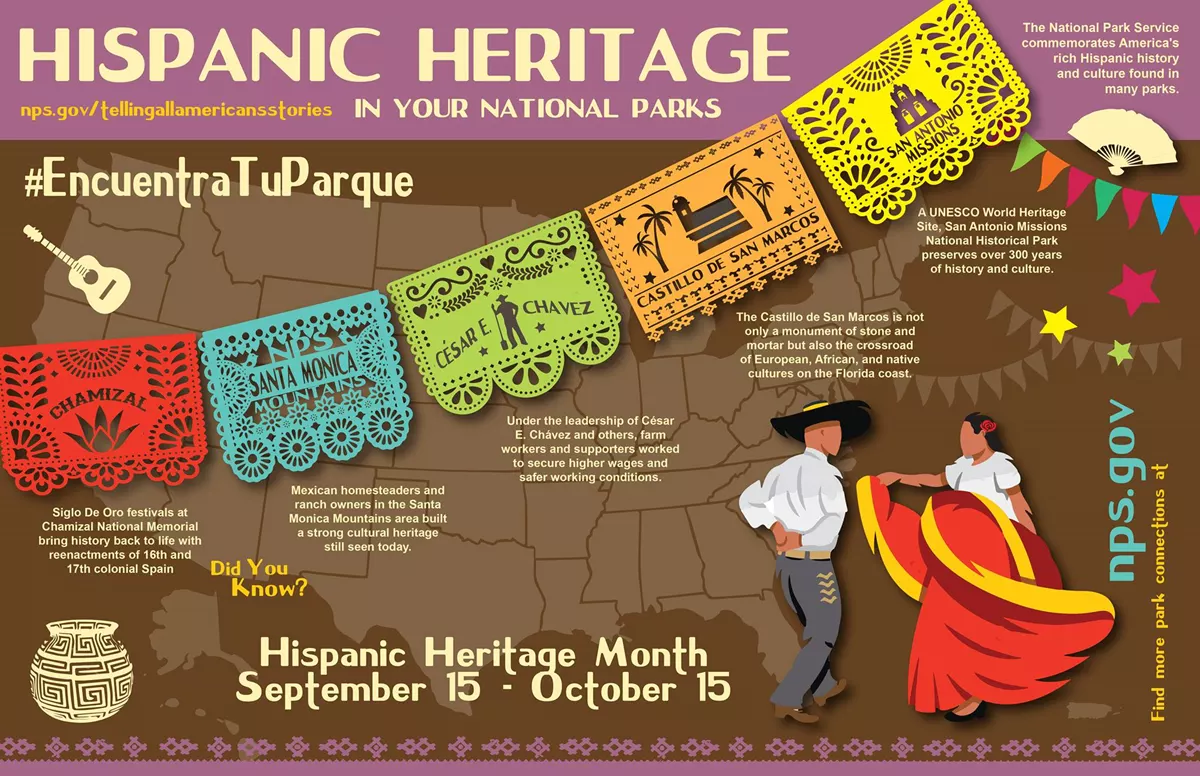
We celebrate Hispanic Heritage Month (September 15 to October 15) to recognize the achievements and contributions of Hispanic Americans. It’s always important to make sure your curriculum includes a variety of history, culture, and people. One simple way to do this during Hispanic Heritage Month is by teaching your students a little about Hispanic history, art, and culture every day as a warm-up activity.
The theme for 2022 is "Unidos: Inclusivity for a Stronger Nation - https://nationalcouncilhepm.org/
Here are some sites with great resources:


20 Activities for Dot Day!
Looking for DOT DAY activities? Check out our new UPDATED blog post with 20 different ideas!
🔴@MicrosoftFlip LIVE w/ @peterhreynolds
⚫️Science Ideas
🟡 Animation Ideas for littles and more!
Link http://themerrillsedu.com/blog-1/2021/9/5/international-dot-day-activities…

Seesaw Messages!
Introducing... Seesaw Messages! Seesaw Messages incorporated educator feedback to create a new and improved way to Message, right inside of Seesaw.
✉️ Start 1:1 messages, group conversations, or whole-group announcements
💬 Choose if a message is one-way or two-way
🔍 Use the search bar to quickly find recipients
Learn more here: https://bit.ly/seesawmessages

Nearpod Quick Launch
🚀#NearpodTip: Use Quick Launch to start a Nearpod activity at any moment without having to create a full lesson!
💬Open Ended Question
⏱Timer
📌Collaborate! Board
💡 Responses can be viewed in real-time & are automatically saved in reports!

35 Conversation Starters
@Catlin_Tucker shared a slide deck with 35 conversation starters—excellent for the start of class.
https://docs.google.com/presentation/d/1wke9CO_91J6D00kfnXCt5TsNKgjEaV9Qd4lvNc72U5w/edit?usp=sharing

10 Closer Activities
Todd Finley @finleyt shared this great infographic of 10 Closure Activities - to make a lasting impression.

Jeff Glade's Sept Podcasts
If you’re looking for #podcasts to use in the classroom, check out the amazing curated lists by @GladeJeff

SO COOL.....

- Flippity - is a free resource for teachers that allows for the creation of quizzes, flash cards, presentations, memory games, word searches, and more.
- Photos for class - Is a website where you can search to download properly attributed, Creative Commons photos for school!
- Storyboard That – Create Engaging Storyboards, Graphic Organizers and Infographics!
- Quick Rubric – Easily Make and Share Great Looking Rubrics!
School is back in session with Newsela!

Newsela has a huge slate of product updates. More than 20+ types of content from biographies and primary sources to multimedia and novel studies. More platform enhancements that make lesson planning and teaching easier while improving learning experiences for students.
What’s new with Newsela Social Studies?
700+ interactive social studies videos that hook students with engaging, interactive videos paired with relevant texts, searchable transcripts, and embedded quizzes.
New and enhanced Teachers Inquiries on civics, the Holocaust, and genocide studies, providing teachers with a standards-aligned, inquiry-based approach to enable student-led exploration and comply with state requirements.
Newly updated course-area collections that help teachers engage students with more present-day connections and structured choice.
What’s new with Newsela ELA?
Updated novel studies collections that provide engaging texts and build background knowledge for now nearly 200 books being read in class, including The Pearl by John Steinbeck, and Dominicana by Angie Cruz.
Nearly 100 new videos with embedded quizzes and searchable transcripts that help teachers strengthen lessons.
New bias and reliability ratings embedded in Newsela texts that improve students’ media literacy and grow their critical thinking skills.
More curated text sets to spark positive discourse in the classroom and help students build evidence-based arguments.
Twice as many relevant topics to support student research projects on everything from women in history to the future of virtual reality to help students build research and presenting skills.
And so much more.....
Back-to-School update from Nearpod!

If you haven't been using Nearpod you've been missing out. Check out all of the new updates they have put together for you.
Redesigned Post Session Reports
Updated Slide Editor & Teacher Dashboard
NEW Enhanced Search
Expanded Lesson Library Nearpod
MORE Learn more https://bit.ly/3StuASe
Plus check out these quick tutorials.

Panda Pro Coaching!

Nobody knows Instructure (Canvas) tools like the Panda Pros! Sign up for free 1:1 online help. Schedule a Panda Pro session today for answers to any of your questions about Canvas by Instructure. There are a lot of tools in Canvas! Do you want pointers on features and tools (like Studio)? The Panda Pros have you covered.
Go to: https://www.instructure.com/panda-pros
Don't have time in your day for PD? What about listening to a Podcast! The Canvasvasters Podcast is the The official podcast of @Instructure, maker of @CanvasLMS. @edtechmarcus and special guests talk #edu/#edtech & teacher leadership through CanvasLMS! #CanvasFam
Apple Professional Learning Virtual Conferences

- To learn more, and register, visit apple.co/apl.
💥NEW!!! 💥- Apple has launched a new professional learning hub for educators called the Apple Education Community, which expands on the resources previously hosted on the Apple Teacher Learning Center and adds a brand new educator Forum, now live in beta.
EUGENE 4J RESOURCES TO HELP YOU GET THE YEAR STARTED!

Curriculum Administrator - Educational Technology


Email: huntley_ju@4j.lane.edu
Website: https://sites.google.com/view/huntley-edtech/justin-huntley
Location: 200 North Monroe Street, Eugene, OR, USA
Phone: 541-790-7587
Twitter: @JustinHuntley