
remove_red_eye 672
page background

Tech this out!

January in the year 2021

Tech this out!January in the year 2021
zoom_out_map

In this newsletter:

  • Easy CBM
  • Eduprotocol lesson resources
  • A Potpourri of points


And, as usual, just a touch of "in case you missed it" flashback news

**********************************************

zoom_out_map

Five things to know about EASY CBM

Hey all you energized educators--- you know what time it is? It's Easy CBM time again! Winter benchmark will be opening on on. Jan 18 (yes, there isn't school that day) and will close at the end of the day on Monday Jan 25. For the 3rd-8th grade teachers who did this in the fall this may be very familiar, but for the 2nd grades (and anyone else who has had anything else going on since September...) here are some tips:


1. You have to direct students to our district link. DO NOT just google EasyCBM. It won't work. Here is that linky link -------> https://hueneme-ca.easycbm.com/


2. Melanie has imported updated rosters. If you have a student who isn't showing on your roster, it is no problem to add a temporary record of their name. (Mel will match it to the actual record later, she's all ninja like that). You just go to the student tab when you are signed in and "add a new record" so the student will see their name on the list.


3. Students have to finish the whole test in one sitting. It doesn't save their progress so they can come back later.


4. Here are some of the docs that have been created to help you:

Screenshot guide for teachers

Quick video to show YOU what it looks like (don't share with students, it has the actual 3rd grade questions on it)

Screenshot guide for students


5. Want to see student results? Check out the Reports tab or button. I'm pretty sure the number you see is just the number correct, and it shows their percentile and risk level. This info might help you plan some small groups at some point (or see who might struggle or need extension), but really, this quick measure isn't intended for the deep dive we may have done in EADMS. It's more like a snapshot screener.

**********************************************

zoom_out_map

Eduprotocols Resource

Yes, it's true, I am trying to put something Eduprotocol related in every newsletter. Why?


Because an Eduprotocol is an accessible idea. There are so many great lesson strategies on the internet, but I know it can feel overwhelming. All your students have devices to use with access to Google Tools. Why not teach them a learning strategy that is fun and that you can re-use with different content? Everything in the Eduprotocol philosophy aligns with what we want as teachers.


There was an Eduprotocol conference in November, and another in Dec. Several of the sessions (some as short as 15 min) were recorded and shared here. If you aren't familiar, check out the "eduprotocols for beginners" box. There are several ideas for littles, and Rack and Stack might be fun for people who are already Eduprotocol-ers.


Here you go ! Let me know what you think!
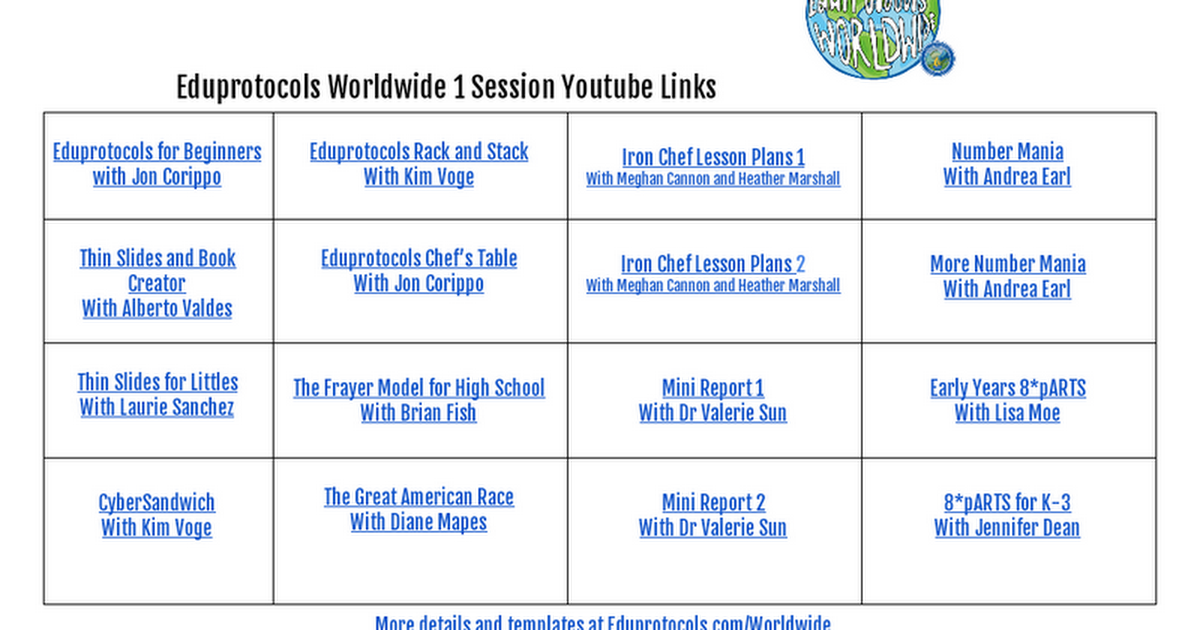
Eduprotocols Worldwide 1 Youtube Links

Eduprotocols Worldwide 1 Youtube Links

launch docs.google.com

**********************************************

A Potpourri of Points for your Perusal!

zoom_out_map

Collections Curriculum Conundrum

If you use CA Collections, the 6-8th grade ELA curriculum, there are a couple things in the online resources that use Flash (not the DC Comics character-- the tech software). Flash is no longer supported by Adobe, the creator of Flash. In fact, Adobe is blocking Flash content as of 1/12, so those parts of the online software probably won't work. We can't fix it, but we are expecting the curriculum company to resolve their programing. Just want you to have a heads up here... sorry for the inconvenience. There is probably more to come, as they say.
UPDATE--- lookie here! There IS more to come, just as I thought.


These elements are NOT impacted: SE, TE, Close Reader, MOST Teacher and Student Resources

These ancillary components ARE impacted: Interactive Whiteboards, NovelWise, Grammar Notes, Writing & Research in a Digital Age, WordSharp, Vocab Tutor


THIS LINK will open a Box (like a Dropbox) with components you can use in place of the ones that don't work now. Hope that is helpful in these trying post-Flash times. :)

zoom_out_map

Pupil Privacy Perspective

I wrote more about it in last month's newsletter, but I want to remind you of a couple student privacy things----


(1) if you have been posting student names with scores in a way that other students can see them, please stop that practice. and


(2) before you have students sign into a software or website, please make sure it has been approved for use. The law doesn't follow the 'ask forgiveness, not permission' rule.

zoom_out_map

Newsela Notion

(that's a stretch. The thesaurus was no help at all!)


Newsela is a cool place to get current events articles to support discussions, especially right now. There will be Friday learning opportunities coming up to share some new cool features. For the immediate, though---

Here are a few more resources to check out that might help guide discussion in the coming weeks. I just know I would have a hard time supporting students during the political goings on of this month and knowing what to say, so maybe it will help you, too. There are resources there, including lesson plans with prompting questions, to share facts and open discussion about everything from impeachment to inauguration. Okay, that's not really an A-Z type range, but you get what I'm saying...


And bonus tidbit--- did you know there is a read aloud feature? Some quick info here for ya!

zoom_out_map

A Sticky Situation

This seems like a good one to end on.... Sticky situation describes this perfectly!


There isn't a right or wrong here, I just want to bring something to your attention--- stickers. More specifically, stickers on district owned technology (laptop, iPad... you get it).

Stickers are cool. I love them. I may have given you stickers. I even have stickers on my district owned laptop. *gasp* Don't hate me because I sticker--- confession is healing.


Okay, so imagine you are new the district, and you get your new-to-you laptop. Welcome! So exciting! Why are there stickers all over this laptop that aren't bad, but you didn't choose? That doesn't feel so 'new and shiny' now, it feels more like borrowing someone else's stuff. You get it.


Here's the thing--- it has been known to happen that a staff member needs a new, let's say, laptop. Then, a year later, they retire. Or they get married and move to Vermont. It happens. The laptop is still good, but it has your stickers on it. See?


No right answer, but here is our bottom line, I think--- be aware. If you put stickers on your stuff, be prepared to remove the stickers, and actually do it, if you need to turn it in. So that it can be used again. Sounds like a do-able ask, right?

**********************************************

zoom_out_map

Learning what you what you want when you want

That is what COAST is all about. A bunch of activities, but you don't have to do them all. Want to know how to use break out rooms in Zoom? Sign into COAST and use the search button to find the task. Looking for some information about online lesson design? Check out the pedagogy mission in level 2.


It is all open and available to everyone with an @hueneme.org account. Coming soon--- a game for our classroom paras!

Are you interested in stuff? COAST points get you that! Are you interested in stuff? COAST points get you that!

zoom_out_map

COAST Surf Shack

Did you know when you learn in COAST, you earn points that can be spent on prizes in the surf shack? Let Lemur Lenny show you a couple options...
zoom_out_map

Laptop stand

Lemur Lenny appreciates that the camera is at a more flattering angle, and his work area is much more organized now. And I know a couple COAST players who are enjoying theirs, too!
zoom_out_map

Blue light glasses

Have you heard of blue light causing headaches? Lemur Lenny doesn't suffer, he wears stylish blue light glasses instead.
Sign into the HESD COAST game and take a peek!
This opens the game on the Alludo website--- sign in with the Google button

**********************************************

FROM THE TECH LAB TABLE---- Did you know... FROM THE TECH LAB TABLE---- Did you know...

zoom_out_map

When families tamper with a district device, they do so at their own peril. :O

We are getting some tickets from families who decide to "clean up" the student iPad by doing things like delete the filtering app or remove a profile. They will likely encounter inconvenient issues like the iPad not working. So, the idea of "cleaning up" an ipad and deleting apps that don't get used is not a great one. Please discourage this if you hear of it.
zoom_out_map

Zoom recordings don't save forever!

Unlimited cloud storage for recorded Zooms-- did you know that the unlimited part is NOT a thing? Why does it matter to you? If you are using Zoom recording and need a recording that is more than 30 days old, you need to DOWNLOAD it and store it in your Google Drive by the end of the year (like the New Year's Eve year).


Because starting Jan 1, recordings in Zoom will only be stored for 30 days before they are automatically removed from cloud storage. See that image? Recordings older than 30 days--- not in cloud storage. If you need something from the fall, download it now and save it in your Google Drive (you can do this in Zoom settings when you sign in at Zoom.us)

zoom_out_map

Talking Points

Many of you have been using Talking Points to communicate with parents and it has many awesome features! Some teachers have found that--- occasionally--- they get a notification that they have received a message, but when they to to view it, it isn't there. Here's what I have to say about that--- it is not ideal! But also, Talking Points is aware of the issue and they are working to resolve it.


In the meantime, their suggestion is to make sure your app is updated, or, uninstall it and reinstall on your phone or tablet. If you are using the website, you will automatically be accessing the most updated webpage when you open it.


As a reminder

---> If you notice errors (a phone number that is wrong, etc) contact your office manager because that information needs to be updated in Q. Then, it will be updated in Talking Points.

**********************************************

See Past Issues of the Tech Newsletter
Click here for links to all past issues of Tech This Out/Teachers with Techitude
zoom_out_map

Liz Hoppe, technology resource specialist

In case you haven't noticed, you are doing awesome and impactful work!

Email: lhoppe@hueneme.org
Website: www.hueneme.org
Location: The Hueneme Tech Lab
Phone: 805-488-3588 9832
Twitter: @hoppeteacher

Loading indicator

close
Powered by