
remove_red_eye 452
page background

Google Gemini

Tech Tip Tuesday (October 21, 2025)

Google Gemini Tech Tip Tuesday (October 21, 2025)
Google GeminiTech Tip Tuesday (October 21, 2025)

💎 What is Google Gemini? 💎 What is Google Gemini?

User uploaded image
zoom_out_map

Google Gemini is a generative Artificial Intelligence (AI) assistant powered by large language models (LLMs) developed by Google. Think of it as a powerful, conversational digital partner that can help you with a wide range of tasks by generating new content, such as text, images, outlines, and summaries, based on your text prompts and instructions.


  • Generative: It creates new, unique content rather than just searching for and retrieving existing information (though it can leverage Google Search for "grounding" its answers and providing sources).

  • Conversational: You interact with it naturally, asking questions or giving instructions in everyday language. You can also follow up on previous responses to refine the output.

  • Multimodal (in its full version): Gemini is designed to understand and generate information across different types of media, including text, images, and code. For instance, you can ask it to analyze an image you upload or create an image based on your description.

  • Accessible: Educators can access Gemini through the dedicated web app at gemini.google.com or through a mobile app. In many educational settings, it is available with enterprise-grade data protections under the Google Workspace for Education terms of service.

📝 How can I use it as a teacher? 📝 How can I use it as a teacher?

Lots of ideas, but here are two quick, yet big concepts!


🥇 Lesson Planning and Content Creation


  • Drafting Lesson Outlines: Teachers can quickly generate a comprehensive lesson plan draft by providing the topic, grade level, and learning objectives.

  • Differentiation for Re-leveling Text: Paste in a complex reading passage and ask Gemini to simplify it to a specific reading level (e.g., a 3rd grade reading level) for struggling learners, or generate an advanced version for enrichment.

  • Quizzes and Assessments: Create quick quizzes (multiple-choice, short answer), exit tickets, or a list of discussion questions on any topic.

  • Rubrics: Generate detailed rubrics for any assignment, such as an essay, a science fair project, or a presentation.

  • Vocabulary Lists: Ask for a list of grade-appropriate vocabulary words for a new unit, complete with definitions and example sentences.

  • "Hooks" and Brainstorming: Generate creative, engaging ideas to start a lesson or brainstorm project-based learning ideas that go beyond typical assignments.


✌🏻 Administrative and Communication Tasks


  • Drafting Communications: Save time by having Gemini draft professional communications that you can then review and personalize, such as:

    • Emails to families

    • School newsletter content or announcements.

    • Letters of recommendation or grant proposal outlines.

  • Summarization: Add in long documents (like a new district policy or a professional reading) and ask Gemini to create a concise bulleted summary to quickly grasp the main points.

  • Translation: Translate short texts or communication snippets into other languages for parents or multilingual learners.

🔰 Is it safe? 🔰 Is it safe?

YES!!

When teachers use Gemini through their school-provided Google Workspace for Education account, they benefit from an essential advantage: enterprise-grade data protection. This is the core safety feature, ensuring that your confidential conversations and uploaded work files are not used to train the underlying AI model and are not reviewed by human contractors, thus maintaining compliance with crucial student privacy laws. This contrasts sharply with the default settings of general consumer AI tools like ChatGPT or Claude, where the data you input is typically used to continuously train their models unless specific, often complex, enterprise agreements are in place, making Gemini the more secure choice for sensitive educational work.

Find it in the Waffle (9 dots) or by going to gemini.google.com! Find it in the Waffle (9 dots) or by going to gemini.google.com!

Not sure how AI chatbots work or why it's important to know how they work? Not sure how AI chatbots work or why it's important to know how they work?

Schedule a time!
Click here to make it easy!
User uploaded image
zoom_out_map Show in original size

A twofer for the people! A twofer for the people!

User uploaded image
zoom_out_map

Customize your own tools easily in Gemini!

Gemini's Gems are custom tools that you can decide how you want it to behave and what outputs are desirable.


EduGems is a curated collection from Eric Curts of pre-made prompts, called designed for educators to use with Google Gemini. Educators can browse, use, or copy these prompts to enhance lessons and classroom activities. Each Gem opens directly in Gemini and are encouraged to select the 2.5 Pro model for better responses. Some sample Gems include curriculum, literacy, student activities, assessment, and support tools.


Prefer a video overview of Gems?
Check out his overview here (12 minute video)!


Check 'em out and add them to your Gemini!

EduGems

Welcome to EduGems! This is a growing collection of pre-made prompts ("Gems") for educators to use with Google Gemini. 💎 Click on any item below to get details on that Gem, with options to use or copy the Gem. 💎 When you click to use a Gem, it will open in Gemini. 💎 Before you begin interacting

launch edugems.ai
User uploaded image
zoom_out_map

👻 It is the spooky szn! 🧙🏻‍♀️

Proctor some new knowledge in your class, and you might Nurse some fun amongst the Coreys!


The Salem Witch Museum provides lesson plans, digital primary sources, and video series that are designed for each grade level. You’ll find interactive virtual programs and live lectures that bring both the 1692 events and modern witch hunts to life, and there are plenty of hands-on activities, creative writing prompts, and recommended reading lists to keep students engaged. Teachers can take their classes on virtual tours of actual trial sites and tap into a wealth of articles from expert historians. No matter if you are teaching colonial history, critical thinking, or conversations around social justice, the museum offers inspiring and practical resources to support your classroom.
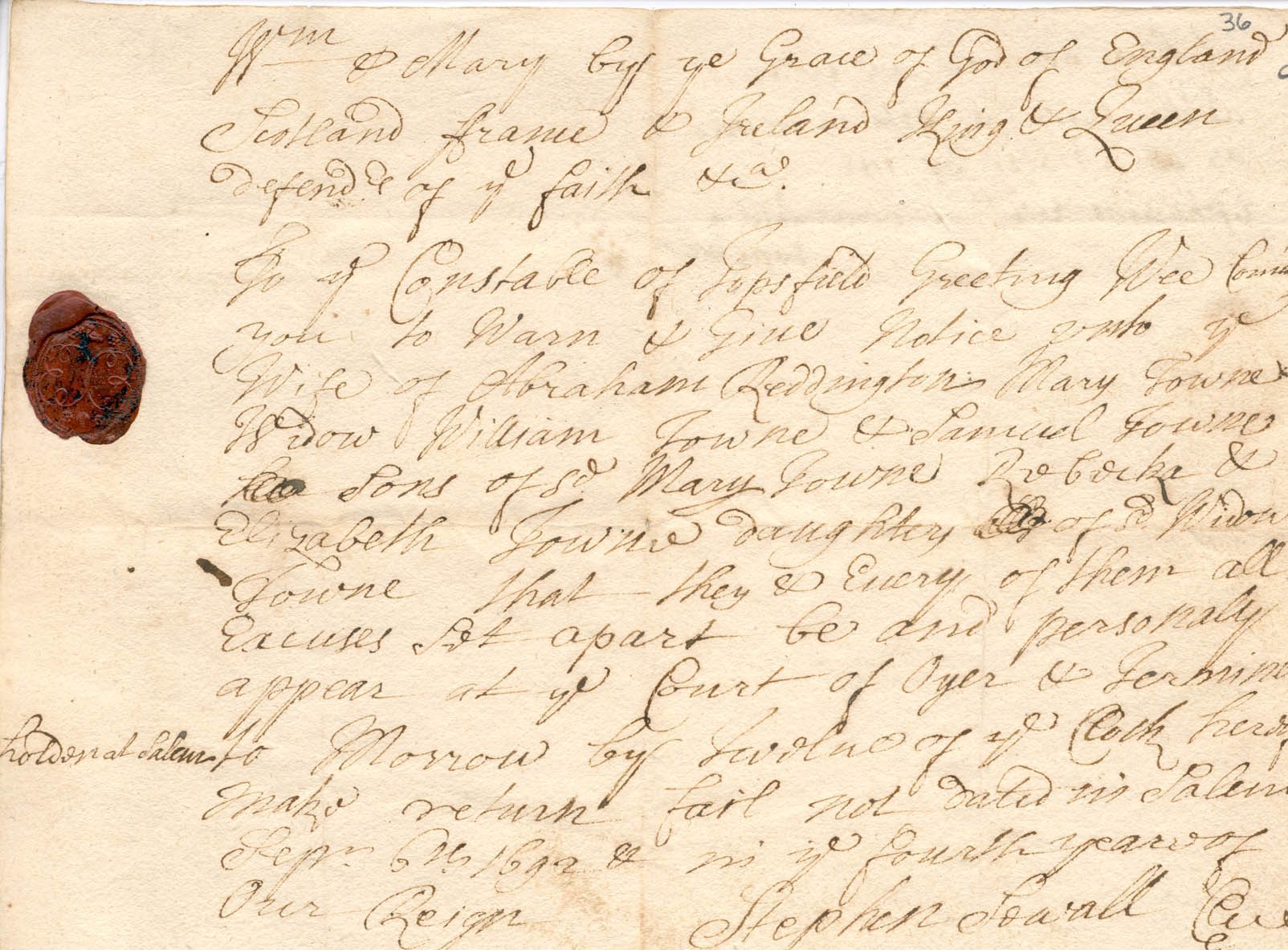
Teacher Resources - Salem Witch Museum

The Salem witch trials of 1692 are a fascinating and complex event in American history. This page has been created to assist educators as they incorporate this important subject into...

launch salemwitchmuseum.com
User uploaded image
zoom_out_map Show in original size
User uploaded image
open_in_new zoom_out_map Show in original size
Schedule a time!
Click here to make it easy!
User uploaded image
open_in_new zoom_out_map Show in original size
User uploaded image
zoom_out_map

Why did the pumpkin lose the boxing match?

The pumpkin let its gourd down.


Made with MagicSchool's Teacher Joke Generator

User uploaded image
zoom_out_map

Brian Krause, Instructional Technology Coach

Contact me to collaborate on your next project, troubleshoot what you do currently, or to just answer a question you have!

Email: bkrause@ltcillinois.org
Booking Link: https://calendly.com/bkrauseltc
Work Cell Phone: (815) 362-4791
Twitter: @bmkeducation

Always happy to meet!
Choose a time here that works best for your schedule!
Tech Tip Tuesday
open_in_new zoom_out_map

Want to catch up on the old tips?

Click here or below for an archive of all Tech Tip Tuesday newsletters.

My Newsletters | Smore

launch smore.com
Make today tolerable!
Thanks for reading!
Loading indicator

close
Powered by