
Smore logo
remove_red_eye 233
page background

ESC 18 - Taco Tech Tuesday

Minus the Tacos, Extra Tech!

ESC 18 - TacoTech Tuesday Minus the Tacos, Extra Tech!

March 3, 2020 March 3, 2020

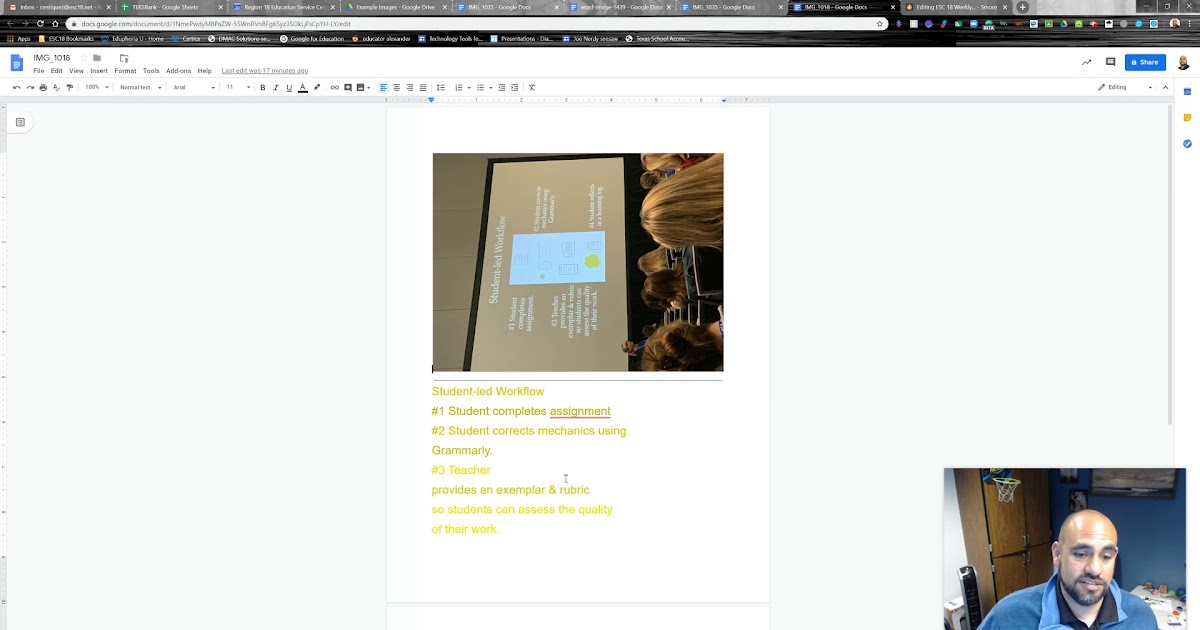
Turn those old hand written notes into word documents!

If you are like me you have tons of old notes you took at a meeting, at a conference or that were shared with you. How awesome would it be to take those handwritten notes, pamphlets, handouts or pictures you took during a conference presentation and turn them into text in a google doc? Watch the video below to see how to take something on paper, and turn it into an electronic document automatically.
ESC 18 Weekly Tech Tip - March 3, 2020 .webm

ESC 18 Weekly Tech Tip - March 3, 2020 .webm

launch drive.google.com

Google Tip #1

If you haven't tried google lens, it will change the way you search for items! Do you like the chairs you sat in at a meeting and want to purchase them yourself? Do you like someone's lamp but don't want to ask where they bought it? Did you see a beautiful statue downtown but don't know anything about it? Are you on vacation in a foreign country and would love to know what that sign says? Try google lens to use google search to find that item, or picture and tell you information about it, or where you can buy it. See the video below for instructions on several phone types and some examples!
How to use Google Lens: The Coolest App You Aren't Using

Esc 18 Go Links

Try our very own short links in Google!

Want to link a website, Professional Development class or google doc/sheet to a group? Customize your very own short link utilizing our own ESC 18 short link site. Instead of sharing a long URL that you will never remember for that google doc, imagine it being as simple as go.esc18.net/AwesomeHandout. All files not only get personalized URL's set up and named by you, but they also keep the ESC 18 website branding. Plus it organizes all your URL files in one location so you never lose or forget them!

Visit go.esc18.net to start creating your own short links for all those websites and files!

Technology HelpDesk

Remember to submit a Technology Help Desk ticket for any technology needs or services. Email Technology at help@esc18.net or call the Help Desk at 561-4321 (x1321)

Google Educator Level 1 and 2 Certification

Click on the image below to learn more about becoming certified as a Google Educator Certification Level 1 and Level 2.
open_in_new zoom_out_map
Archive - Weekly Tech Tips
zoom_out_map

Chris Enriquez

Coordinator of Instructional Technology and Analytics

Email: cenriquez@esc18.net
Location: 2811 La Force Blvd, Midland, TX 79706, USA
Phone: (432)- 567-3249

zoom_out_map

Casey Ritchie

Chief Technology Officer

Email: critchie@esc18.net
Location: 2811 La Force Boulevard, Midland, TX, USA
Phone: (432)-567-3250

Loading indicator

close

Created with

Communicate quickly and effectively with interactive newsletters.

Smore empowers educators to connect with their community, streamline school communications,
and increase engagement.

Create a newsletter