

The Weekly Update #5
October 5th, 2026


🌟District Goal for Beanstack🌟
The district goal for SY26-27 is 20,000,000 (twenty million) minutes.

🌟Teachers Can Log Reading for Themselves in Beanstack!🌟
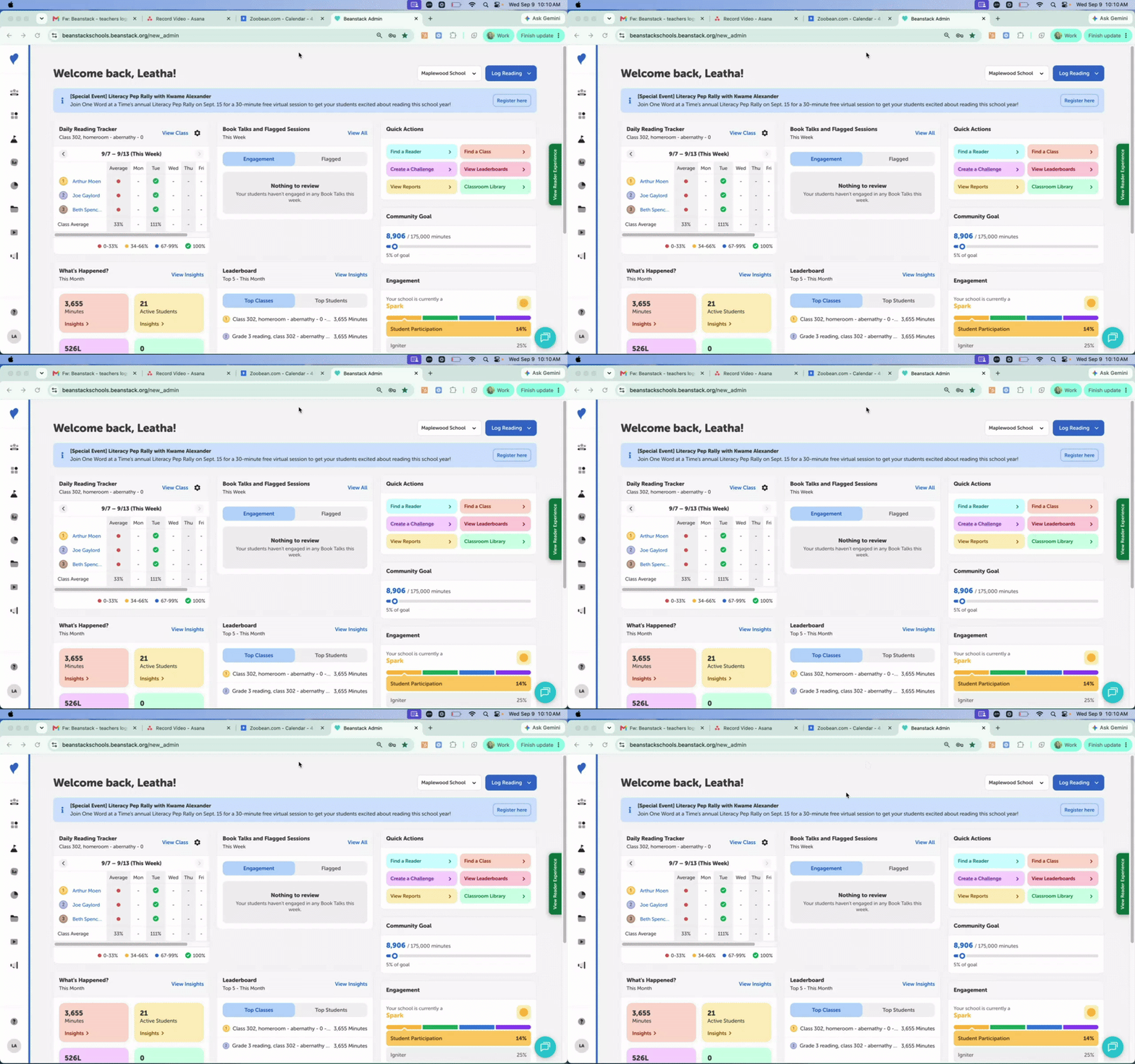
Logging Reading as a Teacher:
- Log in to your school's Beanstack admin account.
- Click the “Log Reading” drop-down menu in the top-right corner of the page.
- Select “Log for Myself” from the menu options.
- Choose your log type (such as minutes or books) under the "Log by..." section.
- Enter the book title, author, minutes read, and date.
- Click “Log Reading” to finish and submit your entry.


🌟Hispanic Heritage Month🌟
We are celebrating Hispanic Heritage Month, 15 September - 15 October, in the Library by presenting students with a variety of reading materials in the following format:
Week 1: Hispanic Athletes
Week 2: Hispanic Artists & Entertainers
Week 3: Scientists & Changemakers
Week 4: Politicians


🌟First Chapter Read Aloud🌟
For the first half of September we are reading the first chapter of various books to the students, it has been wonderfully successful! The premise is simple. We grab a book that we think students will love, then we read a chapter loud. The idea is that a student will love a book, read it, and suggest it to another student and a cycle of reading begins!


🌟Library Media Tech Committee Members🌟
Thank you to Principal Warner, Dr. Jackson, Ms. Campbell and Ms. Caffey who volunteered to be members of the Library Media Tech Committee, Mrs. Collinsworth and Ms. Harlan are also on the committee. Per Georgia State Board of Education Rule 160-4-4-.01, each local school's LMTC is tasked with the planning, operation, evaluation, and improvement of that specific school's media program.


🌟Possible ELT Activities for Digital Citizenship Month🌟
Below, please find some activities you might want to use in your ELT classes to support Digital Citizenship Month.


🌟 For teachers to help students who are having trouble logging into Clever🌟
Greetings, To streamline the Clever login process, please adhere to the following:
1. In the short term, Teachers should sign students in with a Clever backup code: (https://support.clever.com/s/articles/222933888?language=en_US#h_3bc3e162-9643-4522-91ea-5b7963ce3487).
2. Reset Students Password - (http://studentpasswordreset.dekalbschoolsga.org/). If the Active Directory box does not allow access during the login process, please verify the s-number & password are correct. The Active Directory box will keep appearing if the information is incorrect.
3. If the Active Directory box does not allow access after resetting the password (or waiting until the next day), please refer to your building ITT for troubleshooting.
4. If the new password doesn't work after 30 minutes, wait until the next day to log into Clever with the new password. Teacher should sign in students with a Clever backup code.
This has proven to work with the correct credentials. Reply with questions or concerns. See the link below for Clever one-pagers- FAQs. https://www.clever.com/wp-content/uploads/2024/02/Clever-Academy-backup-login-code-work-aid-1.pdf Thanks for all you do, and we look forward to supporting you this year!


🌟Schedule Your Class Into the Library🌟
Click Here to Schedule Your Class
🌟Poster Printing Request Form🌟
Click Here to Request Poster Printing Resources
Only white or light colored backgrounds, saturated backgrounds use way too much ink.
Printing Sizes That Can Be Laminated:
A1 - 23" x 33" - Typical poster size
A2 - 16.5" x 23"
We can only print if files are sent over in the following formats:A3 - 11.5" x 16.5"
- .jpeg
🌟Event Advertisement Request Form🌟
Click here to Request Advertisement for an Event.
🌟Destiny Discover🌟
Click Here for Destiny Discover
Destiny Discover is our online library management and digital reading platform that allows students and teachers to search their school's physical book catalog, discover Follett eBooks, listen to audiobooks, place holds and access curated reading lists and databases.